Service Control Policies are the most powerful preventive control in AWS, and they are responsible for some of the most painful production outages I have seen. The failure mode is always the same: someone writes a policy that looks correct, attaches it to an OU, and then spends three hours at 2 AM figuring out why CloudFormation StackSets, cross-account assumes, or an incident response automation just stopped working. The policy was correct – it just wasn’t precise.
This post is not an introduction to SCPs. If you want the conceptual overview, AWS’s own documentation is adequate. What I want to do here is walk through the non-obvious mechanics, the production failure modes I have personally diagnosed, a tiered strategy that scales across a real organization, and the operational patterns that keep the guardrails from becoming the thing you are guarding against.
One important note before we begin: as of September 2025, AWS expanded SCP syntax to support the full IAM policy language – wildcards at the beginning or middle of Action strings, NotAction in Allow statements, and NotResource. These changes resolve some historical limitations I will point out along the way. And in May 2026, AWS increased the per-node SCP attachment limit from 5 to 10 and the maximum policy size from 5,120 to 10,240 characters – breathing room that reduces the need for the character-compression tricks people previously used.
How SCPs Actually Work (The Parts That Will Surprise You)
The Effective Permissions Formula
Most practitioners understand SCPs as a “ceiling” on permissions, but the precise model matters enormously when you are debugging why something is denied. The effective permissions for any IAM principal in a member account are the intersection of:
- What the SCP chain allows (every SCP from root down to the account must allow an action; a deny at any level kills it)
- What the identity-based policy grants
- What any applicable resource-based policy grants
- What any permissions boundary allows (if set)
With Resource Control Policies (RCPs), introduced in November 2024, there is now a fourth axis: RCPs restrict what principals external to your org can do to your resources, independent of SCPs. SCPs and RCPs operate independently – an RCP that blocks cross-account s3:GetObject cannot be overridden by a permissive SCP, and vice versa. If you are not yet using RCPs alongside your SCPs for S3, KMS, Secrets Manager, SQS, and STS, you are missing half the perimeter.
The common misconception is that SCPs grant permissions. They do not. An SCP defines the outer boundary of what is possible for a principal in a member account. The principal still needs an IAM policy that explicitly allows the action. A member account under a permissive FullAWSAccess SCP with an IAM user that has no attached policies has zero effective permissions.
Inheritance: Why Attaching to Root Is Dangerous
The inheritance model is strict: for an action to be allowed, there must be an explicit Allow at every level from root through each OU down to the account. A deny at any single level propagates to everything beneath it. This asymmetry is critical.
When you attach a Deny SCP at root, it affects every account in your organization. When you attach a Deny SCP at the Workloads OU, it affects every account in Workloads. An explicit Deny cascades down; it cannot be overridden by an Allow at a lower level. This is IAM’s fundamental security design.
The implication for root-level attachments is severe: a poorly written Deny SCP at root is an organization-wide incident in the making. I have seen a region restriction SCP attached to root that forgot to exempt IAM from the NotAction list – suddenly, every account lost the ability to create IAM roles, breaking provisioning pipelines and CloudFormation for the entire organization simultaneously.
My rule: attach only absolute prohibitions (Tier 0 in the strategy below) at root. Everything else goes on OUs.
The Management Account Blind Spot
SCPs have no effect on the management account – not on IAM users, IAM roles, or the root user in the management account. This is a hard architectural constraint in AWS, documented and intentional. The reasoning is that the management account needs a recovery path if SCPs are misconfigured.
The consequence is that the management account is an unguarded island. Any principal with access to the management account can do anything in it, regardless of what your SCPs say. This is why landing zone designs – whether you use Control Tower or build your own – push everything except organization management tooling into member accounts.
What do you do about it? Several things:
- Use the management account for nothing except organization-level operations (account vending, SCP management, consolidated billing). Zero workloads.
- Apply compensating identity-based controls: tight IAM permission boundaries on every human-assumable role, strict MFA enforcement via policy conditions.
- Enable CloudTrail in the management account with an organization trail that you cannot disable from member accounts.
- Alert on every console sign-in to the management account via EventBridge → SNS.
There is no SCP-based solution to this. Accept the constraint and build around it.
Service-Linked Roles: A Frequently Misunderstood Exemption
AWS documentation is unambiguous: SCPs do not restrict service-linked roles. This is stated explicitly in the “Tasks and entities not restricted by SCPs” section of the Organizations documentation. SLRs enable AWS services to act on your behalf – AWSServiceRoleForElasticLoadBalancing, AWSServiceRoleForAutoScaling, and similar. They have permissions attached by AWS, not by you, and they operate outside the SCP evaluation path.
Why does this matter? Because when you write a Deny SCP and test whether it is working, you may observe actions succeeding that you expect to be blocked. If an SLR is performing those actions, your SCP is correct – it just does not govern SLRs. This is the most common “my SCP isn’t working” ticket I receive during SCP reviews.
The corollary: you cannot use SCPs to restrict the scope of what a service-linked role can do. If you need to constrain the reach of a specific AWS service integration, you must use resource-based policies and resource control policies – not SCPs.
NotAction in SCPs Is a Footgun at Scale
NotAction with Deny means “deny everything except these actions.” It looks like a convenient shorthand for region restriction and service allowlisting, and Control Tower uses it extensively. The problem emerges at scale.
Every time AWS launches a new service, or a new API action on an existing service, NotAction implicitly allows it. If you use NotAction to define an allowed service list and AWS launches a new service that your security policy prohibits, that new service is automatically reachable in your accounts until someone notices and updates the NotAction list.
The alternative – explicit Action allowlisting in the Effect: Allow statement – is more maintenance-intensive but closes this gap. For services you actively want to prohibit as they become available, use explicit Deny statements for each. For services you want to restrict to specific regions, NotAction with a well-curated list is pragmatic given that the global services exclusion list already needs maintenance anyway.
The new (September 2025) support for NotAction in Allow statements adds another footgun surface. Using Effect: Allow, NotAction: [...] means “allow everything except these listed actions.” This is almost never what you want in an SCP. If you find yourself writing it, step back and consider whether an explicit Deny achieves the same intent with less blast radius.
aws:PrincipalOrgID: Useful, But Not What You Think
aws:PrincipalOrgID lets you scope resource-based policies – S3 bucket policies, KMS key policies, SQS queue policies – to identities within your AWS Organization. It is tremendously useful for preventing data exfiltration to principals outside your org:
{
  "Effect": "Deny",
  "Principal": "*",
  "Action": "s3:GetObject",
  "Resource": "arn:aws:s3:::my-sensitive-bucket/*",
  "Condition": {
    "StringNotEquals": {
      "aws:PrincipalOrgID": "o-exampleorgid11"
    }
  }
}But aws:PrincipalOrgID is a condition key on resource-based policies and identity-based policies – not an SCP primitive. You cannot use it inside an SCP to scope the SCP itself to specific org IDs (the SCP already applies to your org). Where it does appear in SCPs is in Deny conditions to protect specific resources or in Allow conditions to gate cross-account access, but its most powerful use is in resource-based policies working alongside RCPs.
Do not confuse it with aws:PrincipalOrgPaths, which I will cover in the strategy section.
Common Failure Modes I Have Seen Break Production
Breaking CloudFormation StackSets
AWS CloudFormation StackSets deploy stacks across accounts using the AWSCloudFormationStackSetExecutionRole role in each target account and the AWSCloudFormationStackSetAdministrationRole in the management or delegated admin account. If your SCP includes a broad Deny for cloudformation:* or restricts the IAM permissions that StackSet execution needs to provision resources, StackSets silently fail.
The silent failure is the killer. StackSets return operation-level errors, not SCP-level errors. You will see ACCESS_DENIED on a resource creation inside the stack, trace it back to the execution role, and spend 45 minutes wondering why the execution role’s IAM policy looks fine – before realizing it is the SCP ceiling, not the IAM floor.
Fix: explicitly exempt AWSCloudFormationStackSetExecutionRole and AWSCloudFormationStackSetAdministrationRole from SCPs that restrict IAM or provisioning actions, using aws:PrincipalArn conditions.
Blocking AWS-Managed Provisioning Roles
Similar pattern, broader scope. AWS Control Tower, AWS SSO/IAM Identity Center, and various managed services create provisioning roles in your accounts (AWSControlTowerExecution, AWSReservedSSO_*, OrganizationAccountAccessRole). Broad Deny SCPs on iam:* or organizations:* that lack exemptions for these roles will break account provisioning and break-glass access simultaneously.
I have seen an organization deploy an “IAM user creation block” SCP – perfectly reasonable – that used Effect: Deny, Action: iam:CreateUser with no conditions. The SCP worked as intended for human access paths. But it also blocked a Control Tower customization that needed iam:CreateUser as part of its account factory pipeline, because the execution role was not exempted. Account vending broke without a clear error trail.
The Region Restriction SCP That Forgot Global Services
This one is so common it deserves its own entry. The naive region restriction SCP looks like this:
{
  "Version": "2012-10-17",
  "Statement": [
    {
      "Sid": "DenyNonEURegions",
      "Effect": "Deny",
      "Action": "*",
      "Resource": "*",
      "Condition": {
        "StringNotEquals": {
          "aws:RequestedRegion": ["eu-central-1", "eu-west-1"]
        }
      }
    }
  ]
}Deploy this and you will immediately lose access to IAM, Route53, CloudFront, STS, AWS Support, Billing, Cost Explorer, and a dozen other services whose API endpoints live in us-east-1. These are global services – they do not have regional endpoints and cannot satisfy a region condition pointing to eu-central-1.
The correct pattern uses NotAction to exempt global services from the region restriction, not Action: "*". The AWS Control Tower region deny SCP is the reference implementation and exempts over 60 action namespaces including iam:*, sts:*, route53:*, cloudfront:*, kms:*, config:*, health:*, organizations:*, billing:*, ce:*, and many more. I will provide the full corrected version in the strategy section below.
Locking Out Break-Glass Roles
The scenario: you write a broad Deny at the Workloads OU that restricts sensitive actions for compliance. You do not exempt your emergency access role. An incident hits, someone assumes the break-glass role, and they are blocked by your own SCP from the actions they need to perform containment. Your preventive control has now made your incident response worse.
Every Deny SCP that is broader than a single API action should include a principal exemption:
"Condition": {
  "ArnNotLike": {
    "aws:PrincipalARN": [
      "arn:aws:iam::*:role/BreakGlassRole",
      "arn:aws:iam::*:role/SecurityResponseRole"
    ]
  }
}The * wildcard in the account ID position is intentional – it exempts the named role pattern across all accounts in the org.
s3:GetObject, SCPs, and the Cross-Account Triangle
S3 access involves three policy documents: the caller’s identity-based policy, the bucket resource-based policy, and the SCP chain governing the caller’s account. If the caller is in account A and the bucket is in account B, the SCP on account A applies to the caller, but the SCP on account B does not apply to the caller (because SCPs only govern principals managed by the attached account).
The confusing scenario: you deny s3:GetObject in your Workloads OU SCP to prevent data egress. A principal in a Workloads account can no longer call s3:GetObject against buckets in the same account – correct. But a principal in the management account (SCP-exempt) calling s3:GetObject against a Workloads-account bucket is not restricted by the Workloads SCP – the SCP does not follow the resource, it follows the principal.
This is exactly the data exfiltration gap that RCPs (Resource Control Policies) close. An RCP attached to the Workloads OU restricts what any principal – including org-external ones – can do to resources in those accounts. If you are using SCPs alone to prevent data exfiltration, you are doing it wrong.
Implicit vs. Explicit: sts:AssumeRole and Cross-Account Trust
For cross-account sts:AssumeRole to work, three things must align:
- The calling principal’s identity-based policy must allow
sts:AssumeRolefor the target role ARN - The target role’s trust policy must allow the calling principal
- The SCP on the calling account must allow
sts:AssumeRole
Point 3 is where SCPs bite people. If your SCP strategy uses allowlisting (replacing FullAWSAccess with an explicit allow list) and you forget to include sts:AssumeRole in the allowed actions, every cross-account assume – including the ones your CI/CD pipelines depend on – will fail. The error surfaces as AccessDenied on AssumeRole, which looks exactly like a trust policy problem, and engineers chase the wrong thing.
Recommendation: if you use allowlist SCPs anywhere in your org, run IAM Access Analyzer before applying them to verify that all expected cross-account access paths remain valid.
A Tiered SCP Strategy That Scales
The goal of a tiered model is to match SCP severity to attachment point. Absolute prohibitions live at root, baseline controls live on the non-exempt OU set, and workload-specific controls live on specific OUs. The Sandbox OU deliberately opts out of restrictive tiers to allow experimentation.
See the accompanying diagram for the visual representation of this hierarchy.
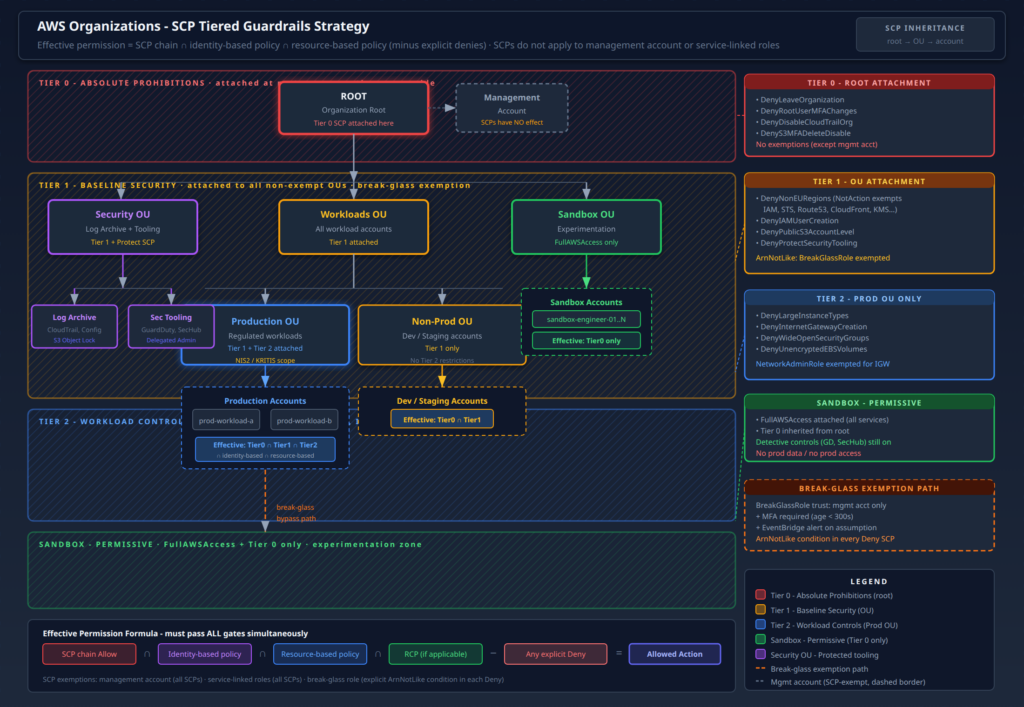
Tier 0: Absolute Prohibitions (Attached at Root)
Tier 0 SCPs express controls that must hold regardless of account type, workload, or emergency. They have no exemptions except the management account’s inherent SCP exemption. Keep this set small – three to five policies maximum.
{
  "Version": "2012-10-17",
  "Statement": [
    {
      "Sid": "DenyLeaveOrganization",
      "Effect": "Deny",
      "Action": "organizations:LeaveOrganization",
      "Resource": "*"
    },
    {
      "Sid": "DenyRootUserActions",
      "Effect": "Deny",
      "Action": [
        "iam:CreateVirtualMFADevice",
        "iam:DeactivateMFADevice",
        "iam:DeleteVirtualMFADevice",
        "iam:EnableMFADevice",
        "iam:ResyncMFADevice"
      ],
      "Resource": "*",
      "Condition": {
        "StringLike": {
          "aws:PrincipalArn": "arn:aws:iam::*:root"
        }
      }
    },
    {
      "Sid": "DenyS3MFADeleteDisable",
      "Effect": "Deny",
      "Action": "s3:PutBucketVersioning",
      "Resource": "*",
      "Condition": {
        "StringEquals": {
          "s3:VersionStatus": "Suspended"
        }
      }
    },
    {
      "Sid": "DenyDisableCloudTrailOrg",
      "Effect": "Deny",
      "Action": [
        "cloudtrail:DeleteTrail",
        "cloudtrail:StopLogging",
        "cloudtrail:UpdateTrail",
        "cloudtrail:DeleteEventDataStore",
        "cloudtrail:UpdateEventDataStore"
      ],
      "Resource": "*",
      "Condition": {
        "ArnNotLike": {
          "aws:PrincipalARN": [
            "arn:aws:iam::*:role/SecurityAuditRole"
          ]
        }
      }
    }
  ]
}The CloudTrail protection SCP illustrates the pattern: block destructive actions on audit infrastructure with a single exception for the Security team’s audit role. Note that this still belongs at root because CloudTrail protection must cover all accounts.
Tier 1: Baseline Security (Attached to All Non-Exempt OUs)
Tier 1 covers the controls that should apply to every non-sandbox, non-management account. This includes region restriction, public S3 block enforcement, IAM user creation prevention, and – for EU-regulated workloads – explicit blocking of non-EU regions.
{
  "Version": "2012-10-17",
  "Statement": [
    {
      "Sid": "DenyNonEURegionsWithGlobalExemptions",
      "Effect": "Deny",
      "NotAction": [
        "account:*",
        "artifact:*",
        "billing:*",
        "budgets:*",
        "ce:*",
        "cloudfront:*",
        "config:*",
        "cur:*",
        "directconnect:*",
        "fms:*",
        "globalaccelerator:*",
        "health:*",
        "iam:*",
        "invoicing:*",
        "kms:*",
        "networkmanager:*",
        "organizations:*",
        "pricing:*",
        "route53:*",
        "route53domains:*",
        "s3:GetAccountPublicAccessBlock",
        "s3:ListAllMyBuckets",
        "s3:PutAccountPublicAccessBlock",
        "savingsplans:*",
        "shield:*",
        "sso:*",
        "sts:*",
        "support:*",
        "trustedadvisor:*",
        "waf:*",
        "wafv2:*"
      ],
      "Resource": "*",
      "Condition": {
        "StringNotEquals": {
          "aws:RequestedRegion": [
            "eu-central-1",
            "eu-west-1"
          ]
        },
        "ArnNotLike": {
          "aws:PrincipalARN": [
            "arn:aws:iam::*:role/BreakGlassRole",
            "arn:aws:iam::*:role/AWSControlTowerExecution"
          ]
        }
      }
    },
    {
      "Sid": "DenyIAMUserCreation",
      "Effect": "Deny",
      "Action": [
        "iam:CreateUser",
        "iam:CreateAccessKey"
      ],
      "Resource": "*",
      "Condition": {
        "ArnNotLike": {
          "aws:PrincipalARN": [
            "arn:aws:iam::*:role/BreakGlassRole",
            "arn:aws:iam::*:role/AccountVendingRole"
          ]
        }
      }
    },
    {
      "Sid": "DenyPublicS3AccountLevel",
      "Effect": "Deny",
      "Action": "s3:PutAccountPublicAccessBlock",
      "Resource": "*",
      "Condition": {
        "ArnNotLike": {
          "aws:PrincipalARN": "arn:aws:iam::*:role/SecurityAuditRole"
        }
      }
    }
  ]
}A few notes on this policy:
The NotAction list for the region restriction is the section that will drift most over time. AWS launches new global services regularly. Treat this list as a living document and wire it to a quarterly review process. The Control Tower region deny policy (linked in references) is the canonical AWS-maintained version you should use as the authoritative base, updating it when AWS publishes new revisions.
DenyIAMUserCreation blocks both user creation and access key creation because access keys without IAM users can still be created for existing users. Exempting AccountVendingRole handles the case where your vending pipeline legitimately creates a service account in certain legacy integrations.
DenyPublicS3AccountLevel blocks anyone from disabling the account-level S3 public access block. It does not set the block (that is a separate configuration baseline), but it prevents removal.
Tier 2: Workload-Specific Controls (Attached to Prod OU)
Tier 2 applies to production workload accounts where you want tighter constraints than baseline. The most useful controls here are instance type restrictions, internet gateway blocking for restricted VPCs, and preventing security group rule permissiveness.
{
  "Version": "2012-10-17",
  "Statement": [
    {
      "Sid": "DenyLargeInstanceTypes",
      "Effect": "Deny",
      "Action": "ec2:RunInstances",
      "Resource": "arn:aws:ec2:*:*:instance/*",
      "Condition": {
        "StringNotLike": {
          "ec2:InstanceType": [
            "t3.*",
            "t3a.*",
            "m5.*",
            "m5a.*",
            "m6i.*",
            "m6a.*",
            "c5.*",
            "c6i.*",
            "r5.*",
            "r6i.*"
          ]
        },
        "ArnNotLike": {
          "aws:PrincipalARN": "arn:aws:iam::*:role/MLWorkloadRole"
        }
      }
    },
    {
      "Sid": "DenyInternetGatewayCreation",
      "Effect": "Deny",
      "Action": [
        "ec2:CreateInternetGateway",
        "ec2:AttachInternetGateway"
      ],
      "Resource": "*",
      "Condition": {
        "ArnNotLike": {
          "aws:PrincipalARN": [
            "arn:aws:iam::*:role/NetworkAdminRole",
            "arn:aws:iam::*:role/BreakGlassRole"
          ]
        }
      }
    }
  ]
}The instance type restriction uses StringNotLike rather than StringEquals for a reason: the former lets you specify families with wildcards (t3.*), while the latter requires exact match on every instance size. With September 2025’s expanded wildcard support in Action strings, keep in mind that the same expansion now applies to condition value comparisons – test carefully.
Sandbox OU: Intentionally Permissive
The Sandbox OU attaches only the FullAWSAccess managed policy plus Tier 0 prohibitions inherited from root. No region restriction, no IAM user block, no instance type limits. Engineers need a place to experiment without filing tickets, and a hardened Sandbox OU is more useful than one with so many guardrails that people work around it using the management account.
What Sandbox is not: a place to store production data, a place to run workloads that access production resources, or a place exempt from security monitoring. GuardDuty, Security Hub, and CloudTrail run identically in Sandbox. The difference is permissive preventive controls, not absent detective controls.
Writing SCPs That Do Not Break Things
The Exemption Pattern
Every non-trivial Deny SCP should follow this structure:
{
  "Effect": "Deny",
  "Action": ["<restricted-action>"],
  "Resource": "*",
  "Condition": {
    "ArnNotLike": {
      "aws:PrincipalARN": [
        "arn:aws:iam::*:role/BreakGlassRole",
        "arn:aws:iam::*:role/<ServiceRole>"
      ]
    }
  }
}Use ArnNotLike rather than ArnNotEquals because NotLike supports wildcards in the ARN, specifically the * in the account ID position. ArnNotEquals requires an exact ARN match, which means you would need to enumerate every account ID – breaking the exemption whenever a new account is added.
The aws:PrincipalIsAWSService condition key deserves mention here. It resolves to true when the caller is an AWS service principal (e.g., lambda.amazonaws.com calling s3:PutObject on behalf of a function). Adding a condition of "BoolIfExists": {"aws:PrincipalIsAWSService": "false"} to a Deny statement prevents you from accidentally blocking service-to-service calls where a human principal is not involved. This is distinct from service-linked roles (which are entirely SCP-exempt); it covers cases like Lambda, CodePipeline, or Config calling APIs on your behalf through execution roles that are not SLRs.
Using aws:PrincipalOrgPaths for Granular Scoping
When a single SCP needs to apply differently to different parts of the org hierarchy, aws:PrincipalOrgPaths lets you scope a statement to principals in a specific OU path:
{
  "Effect": "Deny",
  "Action": "ec2:RunInstances",
  "Resource": "arn:aws:ec2:*:*:instance/*",
  "Condition": {
    "ForAnyValue:StringLike": {
      "aws:PrincipalOrgPaths": [
        "o-exampleorgid11/r-ab12/ou-ab12-22222222/*"
      ]
    },
    "StringNotLike": {
      "ec2:InstanceType": "t3.*"
    }
  }
}This is useful when you want a single Deny SCP attached to root (for governance visibility) but scoped to apply only to principals in a specific OU subtree. It reduces SCP fragmentation at the cost of more complex condition expressions. Use it sparingly – the readability trade-off is real.
Testing Before You Ship
The IAM Policy Simulator does not evaluate SCPs directly. To test SCP effects, use IAM Access Analyzer with the ValidatePolicy API or the Organizations console’s SCP simulation. The most reliable approach remains creating a test OU, moving a non-production account into it, attaching the SCP, and running the actual API calls you expect to be allowed and denied.
AWS CLI for quick validation:
# List SCPs attached to an OU
aws organizations list-policies-for-target \
  --target-id ou-xxxx-yyyyyyyy \
  --filter SERVICE_CONTROL_POLICY

# Simulate effective permissions (requires delegated admin or management account)
aws iam simulate-principal-policy \
  --policy-source-arn arn:aws:iam::123456789012:role/TestRole \
  --action-names s3:GetObject ec2:RunInstances sts:AssumeRole \
--resource-arns "*"Note that simulate-principal-policy does evaluate SCPs when you call it from the management account or from a delegated admin account with the right permissions. From within a member account, it cannot evaluate org-level SCPs and will give you misleadingly permissive results.
Operational Patterns
The Break-Glass SCP Exception
The break-glass role is a pre-provisioned IAM role in each member account (or assumed from the management account) with broad permissions, zero standing access, and aggressive alerting on assumption. Its existence inside your SCP exception list must be documented and controlled.
The risk: if BreakGlassRole is exempt from your SCPs and someone can assume it without triggering alerts, your entire SCP estate is porous. Protect the exemption:
- The
BreakGlassRoletrust policy permits assumption only from the management account root or a specific, MFA-enforced federated role. - An EventBridge rule fires on every
sts:AssumeRoleevent whererequestParameters.roleArncontainsBreakGlassRole, triggering an immediate PagerDuty/SNS alert. - CloudTrail logs for break-glass assumptions are shipped to a security account that the role itself cannot write to.
- Sessions created via break-glass have a maximum duration of one hour and are tagged with
aws:PrincipalTag/BreakGlass: truefor audit correlation.
{
  "Version": "2012-10-17",
  "Statement": [
    {
      "Effect": "Allow",
      "Principal": {
        "AWS": "arn:aws:iam::MANAGEMENT_ACCOUNT_ID:root"
      },
      "Action": "sts:AssumeRole",
      "Condition": {
        "Bool": {
          "aws:MultiFactorAuthPresent": "true"
        },
        "NumericLessThan": {
          "aws:MultiFactorAuthAge": "300"
        }
      }
    }
  ]
}The aws:MultiFactorAuthAge condition (maximum 300 seconds, or 5 minutes) prevents someone from using a stale MFA session – they must have authenticated within the last 5 minutes to assume break-glass.
Proactive SCP Violation Detection
SCPs fail silently from a monitoring perspective – an AccessDenied from an SCP looks identical to an AccessDenied from a missing IAM policy. The error response will say User: arn:aws:iam::123456789012:user/alice is not authorized to perform: s3:GetObject on resource: ... with an explicit deny.
To distinguish SCP denials from IAM denials, parse CloudTrail events for errorCode: AccessDenied with errorMessage containing explicit deny AND cross-reference against your known Deny SCPs. A Denial from an SCP will originate from a policy attached to the org hierarchy, not from an identity-based policy – IAM Access Analyzer can help correlate.
More operationally useful: an EventBridge rule that fires on AccessDenied events for specific high-value API calls (e.g., cloudtrail:DeleteTrail, organizations:LeaveOrganization, iam:DeletePolicy) gives you real-time visibility into SCP effectiveness. These are exactly the actions your Tier 0 SCPs protect, so an AccessDenied on them is proof the guardrail is working – and worth alerting on regardless.
{
  "source": ["aws.cloudtrail"],
  "detail-type": ["AWS API Call via CloudTrail"],
  "detail": {
    "errorCode": ["AccessDenied"],
    "eventName": [
      "DeleteTrail",
      "StopLogging",
      "LeaveOrganization",
      "DeleteOrganization",
      "DetachPolicy",
      "DisablePolicyType"
    ]
  }
}Route this to an SNS topic with email and Slack integration. Every hit is a signal that someone tried to violate a Tier 0 control.
The Immutable Audit Trail Pattern
SCPs cannot protect the management account. But you can protect the audit logging infrastructure itself.
The pattern:
- Create a Security OU containing two accounts: a log archive account and a security tooling account.
- The log archive account receives all CloudTrail, Config, and VPC Flow Logs from the org via organization trails and AWS Config aggregation. Its S3 buckets have Object Lock enabled with Compliance mode.
- Attach an SCP to the Security OU that prevents deletion of S3 buckets in the log archive account, prevents disabling Object Lock, and prevents modification of the org trail configuration.
- The security tooling account runs GuardDuty (delegated admin), Security Hub (delegated admin), and Access Analyzer. The SCP for the Security OU prevents disabling any of these.
{
  "Sid": "ProtectSecurityTooling",
  "Effect": "Deny",
  "Action": [
    "guardduty:DisassociateFromMasterAccount",
    "guardduty:DeleteDetector",
    "guardduty:StopMonitoringMembers",
    "securityhub:DisableSecurityHub",
    "securityhub:DisassociateFromMasterAccount",
    "config:DeleteConfigurationRecorder",
    "config:StopConfigurationRecorder",
    "config:DeleteDeliveryChannel"
  ],
  "Resource": "*",
  "Condition": {
    "ArnNotLike": {
      "aws:PrincipalARN": "arn:aws:iam::*:role/SecurityAuditRole"
    }
  }
}This SCP is attached to the Security OU itself – it protects the security account from being tampered with even if an attacker gains access to a security tooling account’s IAM credentials. Combined with Object Lock on S3, it provides a reasonably tamper-resistant audit foundation.
Documenting Intent with Tagging and SIDs
Use Sid fields as documentation. A poorly named Sid like "Stmt1" is useless when you are triaging an AccessDenied at 3 AM. Use descriptive SIDs: DenyNonEURegionsWithBreakGlassExemption, Tier0DenyLeaveOrg, Tier1BlockIAMUserCreation.
At the SCP document level, AWS does not support native tagging of SCP policies – frustratingly. The workaround is encoding metadata in the SCP name and description fields via the Organizations API, and maintaining a Terraform module that maps SCP names to their owner, tier, attachment targets, and last-reviewed date. When you have 30+ SCPs across a large org, unowned SCPs become a liability fast.
What I Would Do Differently
Every organization I have worked with that built SCP guardrails from scratch made the same sequence of mistakes: start with too many Deny statements at root, forget global services in region restriction, have no break-glass exemption strategy, and have no automated detection of SCP enforcement. The retrospective always includes a postmortem where the SCP that was supposed to protect something instead blocked incident response.
The structural insight is this: SCPs are write-once, deploy-everywhere controls in a system that is also your recovery path when things go wrong. Before you attach anything to root, ask: “if this SCP had a bug, how would I recover?” If the answer is “I cannot,” the SCP belongs on an OU, not on root.
With the September 2025 syntax expansions and the May 2026 quota increases, there is now more room to write precise, legible SCPs without the character-compression gymnastics of the past. Use that room. An SCP that is easy to read is an SCP that is easy to audit, easy to update when it breaks something, and easy to explain to a compliance officer.
References
- AWS Organizations SCP documentation
- SCP evaluation logic
- SCP examples – General
- AWS Control Tower Region Deny policy (canonical global services exemption list)
- Introducing Resource Control Policies (RCPs)
- AWS Organizations full IAM policy language for SCPs (September 2025)
- AWS Organizations increased SCP quotas (May 2026)
- How to use SCPs to set permission guardrails
- Essential controls to prevent unauthorized account removal
- IAM Policy Evaluation Logic
- aws:RequestedRegion condition key reference