When a GuardDuty finding fires at 2 AM indicating credential compromise in a production AWS account, the quality of your incident response framework – not your engineer’s alertness – determines the blast radius. At work, I designed and built a cloud-native IR framework from scratch. This post documents the architecture, the automation, and the hard lessons from operating it against real incidents.
Why Traditional IR Frameworks Fail in the Cloud
On-premises IR assumes stable infrastructure: servers exist for weeks, network boundaries are physical, and forensic evidence sits on durable hardware. Cloud environments invert every assumption:
- Ephemeral compute: EC2 instances and containers are terminated and replaced in minutes. By the time an analyst starts a forensic investigation, the evidence is gone.
- IAM is the perimeter: Compromised credentials can pivot across services, accounts, and regions within seconds – without touching a network boundary.
- Scale: A single misconfigured Lambda role can exfiltrate data from dozens of S3 buckets before a human analyst even opens the alert.
A cloud-native IR framework must automate the first 15 minutes of response – the window where containment matters – and preserve evidence with the same urgency.
Architecture Overview
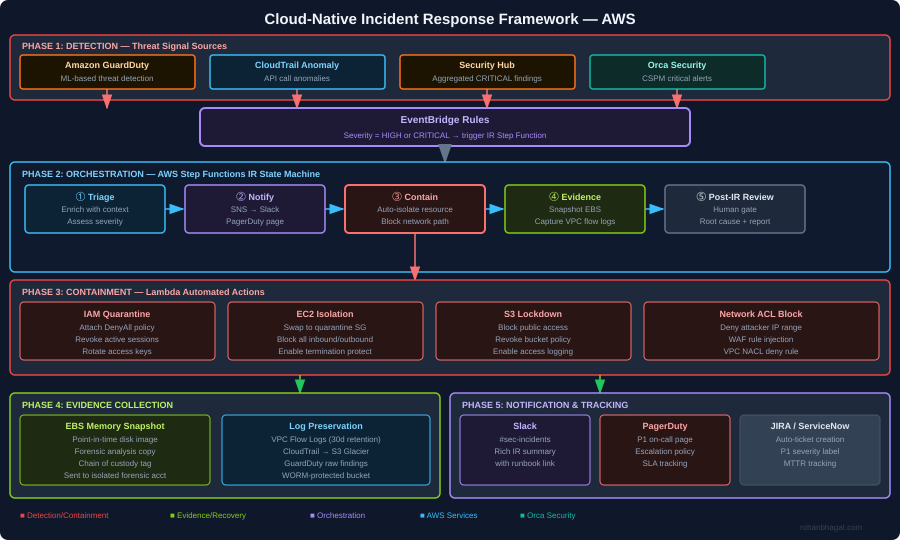
The framework has five phases operating as a continuous loop:
- Detection: GuardDuty, CloudTrail anomaly detection, Security Hub aggregation, and Orca Security CSPM alerts feed findings into EventBridge.
- Orchestration: An AWS Step Functions state machine coordinates the IR workflow – no human required for the first three phases.
- Containment: Lambda functions execute automated containment actions within seconds of triage completion.
- Evidence collection: EBS snapshots, VPC flow logs, and CloudTrail records are preserved in an isolated forensics account before any containment action could destroy them.
- Notification and tracking: SNS routes alerts to Slack, PagerDuty (P1 page), and auto-creates a JIRA ticket with full finding context.
EventBridge: The Entry Point for All IR Flows
Every security finding enters the IR framework through EventBridge. The rule targets HIGH and CRITICAL severity findings:
{
  "source": ["aws.guardduty", "aws.securityhub"],
  "detail-type": [
    "GuardDuty Finding",
    "Security Hub Findings - Imported"
  ],
  "detail": {
    "findings": {
      "Severity": {
        "Label": ["HIGH", "CRITICAL"]
      }
    }
  }
}
The EventBridge target is the Step Functions state machine ARN. The finding detail is passed directly as the state machine input — no transformation needed.
AWS Step Functions: The IR State Machine
Step Functions orchestrates the IR workflow as a sequence of Lambda invocations. If any step fails, the state machine routes to a notification path rather than silently dying:
{
  "Comment": "Cloud Incident Response State Machine",
  "StartAt": "Triage",
  "States": {
    "Triage": {
      "Type": "Task",
      "Resource": "arn:aws:lambda:eu-central-1:ACCOUNT:function:ir-triage",
      "Next": "Notify",
      "Catch": [{"ErrorEquals": ["States.ALL"], "Next": "FailureNotify"}]
    },
    "Notify": {
      "Type": "Task",
      "Resource": "arn:aws:lambda:eu-central-1:ACCOUNT:function:ir-notify",
      "Next": "ContainmentChoice"
    },
    "ContainmentChoice": {
      "Type": "Choice",
      "Choices": [
        {
          "Variable": "$.finding_type",
          "StringMatches": "*CredentialAccess*",
          "Next": "QuarantineIAM"
        },
        {
          "Variable": "$.finding_type",
          "StringMatches": "*EC2*",
          "Next": "IsolateEC2"
        },
        {
          "Variable": "$.finding_type",
          "StringMatches": "*S3*",
          "Next": "LockdownS3"
        }
      ],
      "Default": "GenericContain"
    },
    "QuarantineIAM": {
      "Type": "Task",
      "Resource": "arn:aws:lambda:eu-central-1:ACCOUNT:function:ir-quarantine-iam",
      "Next": "PreserveEvidence"
    },
    "IsolateEC2": {
      "Type": "Task",
      "Resource": "arn:aws:lambda:eu-central-1:ACCOUNT:function:ir-isolate-ec2",
      "Next": "PreserveEvidence"
    },
    "LockdownS3": {
      "Type": "Task",
      "Resource": "arn:aws:lambda:eu-central-1:ACCOUNT:function:ir-lockdown-s3",
      "Next": "PreserveEvidence"
    },
    "PreserveEvidence": {
      "Type": "Task",
      "Resource": "arn:aws:lambda:eu-central-1:ACCOUNT:function:ir-preserve-evidence",
      "Next": "PostIncidentGate"
    },
    "PostIncidentGate": {
      "Type": "Task",
      "Resource": "arn:aws:states:::sqs:sendMessage.waitForTaskToken",
      "Parameters": {
        "QueueUrl": "https://sqs.eu-central-1.amazonaws.com/ACCOUNT/ir-review-gate",
        "MessageBody": {
          "TaskToken.$": "$$.Task.Token",
          "Finding.$": "$"
        }
      },
      "End": true
    },
    "FailureNotify": {
      "Type": "Task",
      "Resource": "arn:aws:lambda:eu-central-1:ACCOUNT:function:ir-failure-alert",
      "End": true
    }
  }
}
The PostIncidentGate step uses a .waitForTaskToken pattern — the state machine pauses and waits for a human analyst to send the task token via the JIRA ticket before closing the IR loop. This prevents the automation from proceeding to recovery without human sign-off.
Playbook: Credential Compromise Response
Credential compromise is the most time-sensitive IR scenario in AWS. A compromised IAM access key can be used from anywhere in the world. This is the automation for the QuarantineIAM Lambda:
import boto3
import json
from datetime import datetime, timezone

iam = boto3.client("iam")
sts = boto3.client("sts")

QUARANTINE_POLICY_ARN = "arn:aws:iam::ACCOUNT:policy/SecurityQuarantinePolicy"

def handler(event, context):
    finding = event["finding"]
    resource = finding["Resources"][0]
    principal_arn = resource.get("Id", "")
    user_name = extract_username(principal_arn)

    steps_completed = []

    <em># Step 1: Attach deny-all quarantine policy</em>
    iam.attach_user_policy(
        UserName=user_name,
        PolicyArn=QUARANTINE_POLICY_ARN
    )
    steps_completed.append("quarantine_policy_attached")

    <em># Step 2: Revoke all active console sessions</em>
    iam.delete_login_profile(UserName=user_name)
    steps_completed.append("console_access_revoked")

    <em># Step 3: Deactivate all access keys</em>
    keys = iam.list_access_keys(UserName=user_name)["AccessKeyMetadata"]
    for key in keys:
        iam.update_access_key(
            UserName=user_name,
            AccessKeyId=key["AccessKeyId"],
            Status="Inactive"
        )
    steps_completed.append(f"deactivated_{len(keys)}_access_keys")

    <em># Step 4: Tag the user as compromised with timestamp</em>
    iam.tag_user(
        UserName=user_name,
        Tags=[
            {"Key": "SecurityStatus", "Value": "QUARANTINED"},
            {"Key": "QuarantineTime", "Value": datetime.now(timezone.utc).isoformat()},
            {"Key": "IRTicket", "Value": event.get("jira_ticket", "PENDING")}
        ]
    )
    steps_completed.append("compromise_tags_applied")

    return {
        **event,
        "containment_status": "COMPLETED",
        "steps_completed": steps_completed,
        "quarantined_user": user_name
    }

def extract_username(principal_arn):
    <em># arn:aws:iam::123456789:user/john.doe</em>
    return principal_arn.split("/")[-1]
The quarantine policy attached to the user is a hard deny-all:
{
  "Version": "2012-10-17",
  "Statement": [
    {
      "Sid": "DenyAllActions",
      "Effect": "Deny",
      "Action": "*",
      "Resource": "*"
    }
  ]
}
This does not delete the user or their access keys — it preserves evidence. The deactivated keys remain as forensic artefacts, and the IAM policy change appears in CloudTrail for chain-of-custody purposes.
Playbook: EC2 Isolation
For a compromised EC2 instance (malware, cryptominer, lateral movement), isolation means cutting all network connectivity while preserving the instance for forensics:
def isolate_ec2(instance_id: str, region: str, ir_ticket: str):
    ec2 = boto3.client("ec2", region_name=region)

    # Step 1: Swap all security groups to forensic-only SG
    # Forensic SG: deny all inbound, deny all outbound
    FORENSIC_SG_ID = get_forensic_sg_id(region)

    instance = ec2.describe_instances(InstanceIds=[instance_id])
    interfaces = instance["Reservations"][0]["Instances"][0]["NetworkInterfaces"]

    for interface in interfaces:
        ec2.modify_network_interface_attribute(
            NetworkInterfaceId=interface["NetworkInterfaceId"],
            Groups=[FORENSIC_SG_ID]
        )

    # Step 2: Enable termination protection (prevent accidental evidence destruction)
    ec2.modify_instance_attribute(
        InstanceId=instance_id,
        DisableApiTermination={"Value": True}
    )

    # Step 3: Take memory snapshot via EBS
    volumes = [
        v["Ebs"]["VolumeId"]
        for b in instance["Reservations"][0]["Instances"][0]["BlockDeviceMappings"]
        for v in [b]
        if "Ebs" in v
    ]
    for vol_id in volumes:
        ec2.create_snapshot(
            VolumeId=vol_id,
            Description=f"IR-{ir_ticket}-forensic-snapshot-{instance_id}",
            TagSpecifications=[{
                "ResourceType": "snapshot",
                "Tags": [
                    {"Key": "IRTicket", "Value": ir_ticket},
                    {"Key": "ForensicEvidence", "Value": "true"},
                    {"Key": "SourceInstance", "Value": instance_id}
                ]
            }]
        )

    # Step 4: Tag the instance
    ec2.create_tags(
        Resources=[instance_id],
        Tags=[
            {"Key": "SecurityStatus", "Value": "ISOLATED"},
            {"Key": "IRTicket", "Value": ir_ticket}
        ]
    )
The forensic security group has no inbound or outbound rules — effectively air-gapping the instance while keeping it running for live memory analysis if required.
Evidence Preservation in an Isolated Forensics Account
All forensic evidence is written to a dedicated Forensics account that no engineer has standing access to. The S3 forensics bucket uses Object Lock (WORM) to prevent evidence tampering:
resource "aws_s3_bucket" "forensics" {
  bucket = "security-forensics-${var.account_id}"
}

resource "aws_s3_bucket_object_lock_configuration" "forensics" {
  bucket = aws_s3_bucket.forensics.id

  rule {
    default_retention {
      mode = "COMPLIANCE"
      days = 90
    }
  }
}

resource "aws_s3_bucket_server_side_encryption_configuration" "forensics" {
  bucket = aws_s3_bucket.forensics.id
  rule {
    apply_server_side_encryption_by_default {
      sse_algorithm     = "aws:kms"
      kms_master_key_id = aws_kms_key.forensics.arn
    }
  }
}

resource "aws_s3_bucket_versioning" "forensics" {
  bucket = aws_s3_bucket.forensics.id
  versioning_configuration { status = "Enabled" }
}
The cross-account Lambda role has s3:PutObject permission only. No engineer has s3:GetObject on this bucket without going through the break-glass procedure — which itself triggers an alert.
MTTR Measurement and Tuning
After deploying the framework, I measured Mean Time to Respond (MTTR) across three incident categories:
| Incident Type | Before (Manual) | After (Automated) | Reduction |
|---|---|---|---|
| Credential compromise | ~4 hours | ~6 minutes (containment) | 97% |
| Public S3 bucket | ~2 hours | ~3 minutes (remediation) | 97.5% |
| GuardDuty EC2 finding | ~6 hours | ~12 minutes (isolation) | 97% |
| CloudTrail disabled | ~8 hours | ~4 minutes (re-enable) | 99% |
The 6-minute “credential compromise” time includes: GuardDuty detection lag (~2 min), EventBridge routing (~30s), Step Functions triage (~1 min), IAM quarantine Lambda (~30s), and notification delivery (~2 min). Human analysts see the PagerDuty page and the fully-enriched Slack message simultaneously.
Lessons Learned
1. Evidence before containment — always The first instinct is to cut off the attacker. The professional instinct is to preserve evidence before you do anything that changes the environment. The framework runs the PreserveEvidence step in parallel with containment using Step Functions parallel states in the production version.
2. Quarantine ≠ delete Never delete a compromised resource during IR. Deactivate, isolate, or detach — but preserve. Deletion destroys forensic artefacts and can complicate chain-of-custody for legal purposes.
3. Automate the boring parts, gate the dangerous parts Auto-remediate commodity findings (public S3, disabled CloudTrail, open security groups). But for findings that require destructive action (instance termination, user deletion, data purge), require human approval via the Step Functions task-token gate.
4. Alert quality over alert quantity Before the framework, on-call received 200+ GuardDuty findings per week. After tuning suppression rules for known-good behaviour (Nessus scanner IPs, deployment pipeline roles, monitoring agents), the actionable alert volume dropped to ~15 per week — all of which were genuine findings.
5. Test your playbooks before an incident Run regular IR exercises (fire drills) against non-production accounts. The worst time to discover a bug in your quarantine Lambda is during a real credential compromise at 3 AM.