In a multi-account AWS environment handling energy trading workloads, a single misconfigured S3 bucket or an overly permissive IAM role is not just a security finding. It is a compliance violation, a potential regulatory breach, and an audit risk. If faced with this challenge at scale: dozens of accounts, hundreds of Terraform modules, and a continuous pressure to ship infrastructure quickly without compromising security posture.
This post documents the CSPM architecture I designed and implemented entirely on AWS-native services, deployed with Terraform. No third-party CSPM platforms, no external agents. It is a centralized, automated control plane that continuously monitors posture, enforces policy, and auto-remediates critical findings, built only from services that ship inside AWS and integrate natively through AWS Organizations.
Why AWS-Native?
Third-party CSPM platforms add real value, but they also add cost, a separate identity and data-egress surface, and another vendor in the audit scope. For a regulated workload, I wanted the control plane to live entirely inside the AWS trust boundary, with findings normalised in one format and no cloud data leaving the account perimeter.
AWS-native tooling delivers this through tight, low-latency integration: every detective service emits findings in the AWS Security Finding Format (ASFF), every finding lands in AWS Security Hub, and Security Hub becomes the single pane of glass and the single trigger source for automation. Enrolment is driven by AWS Organizations, so new accounts inherit the entire stack the moment they are created. Terraform remains the deployment tool: it provisions and versions every one of these native services as code.
The Problem with Point-in-Time Security Reviews
Traditional cloud security reviews are periodic. A team runs a checklist against a snapshot of the environment, flags findings, and assigns tickets. By the time those tickets are resolved, the environment has drifted further. In fast-moving cloud environments, this model breaks down within weeks.
The operational shift required is continuous posture management: every configuration change is evaluated against policy the moment it is applied, and deviations are either blocked before they land or remediated automatically within minutes.
Architecture Overview
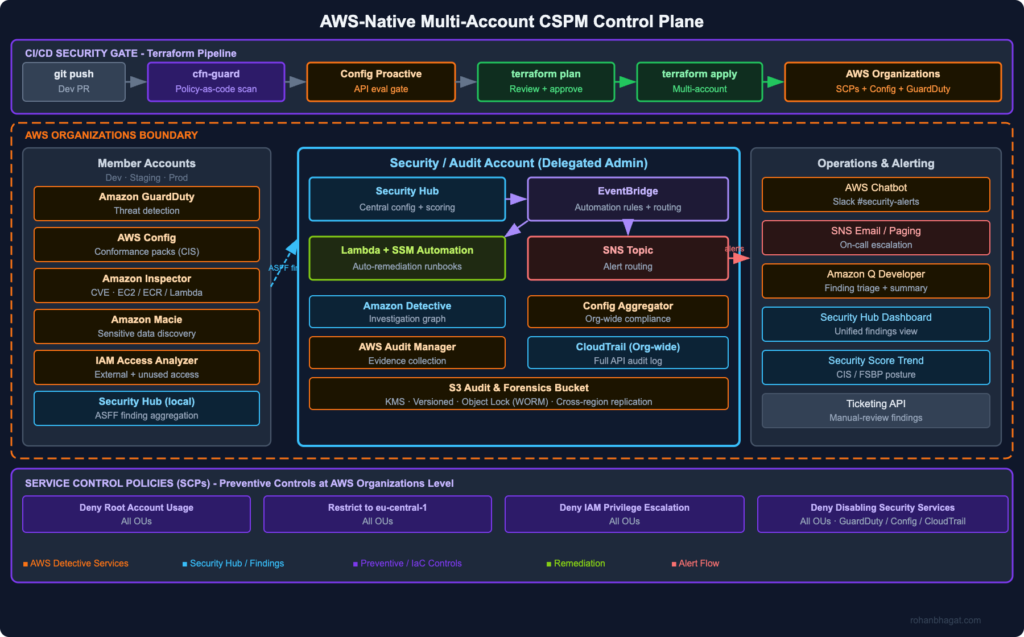
The architecture has three layers, all built on AWS-native services and deployed with Terraform:
Preventive layer: AWS CloudFormation Guard (cfn-guard) runs in the CI/CD pipeline and blocks non-compliant Terraform before it is applied, evaluating the terraform plan JSON against policy-as-code rules. AWS Config proactive rules evaluate resources against compliance rules before they are provisioned. AWS Organizations Service Control Policies (SCPs) enforce hard boundaries that no account-level policy can override.
Detective layer: Amazon GuardDuty, AWS Config rules and conformance packs, Amazon Inspector, Amazon Macie, and IAM Access Analyzer continuously monitor all accounts. AWS Security Hub aggregates every finding centrally in the Security/Audit account, scored against the CIS, AWS Foundational Security Best Practices, and NIST 800-53 standards.
Responsive layer: Amazon EventBridge rules trigger AWS Lambda functions and AWS Systems Manager Automation runbooks that auto-remediate critical findings (for example public S3 buckets, disabled CloudTrail, overly permissive security groups) within minutes of detection.
Setting Up the Security Account as the Control Plane
All findings flow into a dedicated Security/Audit account. This account is not a workload account: it exists solely to aggregate, analyse, and act on security findings. AWS Security Hub and GuardDuty are delegated to this account as the organization administrator, and Security Hub central configuration pushes a single policy to every member account and Region.
# securityhub-control-plane.tf - applied in the Security/Audit account# Aggregate findings from all Regions into the home Regionresource "aws_securityhub_finding_aggregator""central"{linking_mode="ALL_REGIONS"}# Enable the security standards used for posture scoringresource "aws_securityhub_standards_subscription""cis"{standards_arn="arn:aws:securityhub:${var.region}::standards/cis-aws-foundations-benchmark/v/3.0.0"}resource "aws_securityhub_standards_subscription""fsbp"{standards_arn="arn:aws:securityhub:::ruleset/finding-format/aws-foundational-security-best-practices/v/1.0.0"}# Push one Security Hub policy to all current and future org membersresource "aws_securityhub_organization_configuration""central"{auto_enable=trueauto_enable_standards="DEFAULT" organization_configuration {configuration_type="CENTRAL"}}
GuardDuty is enabled organization-wide with the same delegated-admin model, so every member account is enrolled automatically and inherits the full detection stack on creation. No manual onboarding required.
# Designate the Security account as GuardDuty delegated adminresource "aws_guardduty_organization_admin_account""delegated"{admin_account_id= var.security_account_id}resource "aws_guardduty_detector""main"{enable=true}# Auto-enable GuardDuty and its features for all org membersresource "aws_guardduty_organization_configuration""auto_enable"{auto_enable_organization_members="ALL"detector_id= aws_guardduty_detector.main.id datasources { s3_logs {auto_enable=true} kubernetes { audit_logs {enable=true}} malware_protection { scan_ec2_instance_with_findings { ebs_volumes {auto_enable=true}}}}}
Preventive Controls: CloudFormation Guard on the Terraform Plan
The pipeline never reaches terraform apply unless the plan passes policy validation. AWS CloudFormation Guard (cfn-guard) is an AWS open-source policy-as-code engine. Despite the name, it evaluates any JSON or YAML, including the JSON output of terraform show, against declarative rules written in its own domain-specific language. It replaces third-party IaC scanners with a tool that AWS itself maintains and ships.
# .github/workflows/security-gate.yml-name:Generate Terraform plan JSONrun:| terraform plan -out=plan.tfplan terraform show -json plan.tfplan > plan.json-name:Install cfn-guardrun:| curl --proto '=https' --tlsv1.2 -sSf \ https://raw.githubusercontent.com/aws-cloudformation/cloudformation-guard/main/install-guard.sh | sh-name:Validate plan against security rulesetrun:| ~/.guard/bin/cfn-guard validate \ --rules policies/aws-security.guard \ --data plan.json \ --show-summary fail
The ruleset reads the resource_changes array from the Terraform plan and encodes the same posture controls we score against in Security Hub, but enforced before a resource is ever created:
# policies/aws-security.guard - evaluated against `terraform show -json`# S3 buckets must block all public accesslet public_access= resource_changes[type=="aws_s3_bucket_public_access_block"]rule s3_block_public_accesswhen %public_access !empty{%public_access.change.after{ block_public_acls ==true block_public_policy ==true ignore_public_acls ==true restrict_public_buckets ==true}}# S3 buckets must declare server-side encryptionlet s3_encryption= resource_changes[type=="aws_s3_bucket_server_side_encryption_configuration"]rule s3_encryption_requiredwhen %s3_encryption !empty{%s3_encryption.change.after.rule[*].apply_server_side_encryption_by_default.sse_algorithm in ["aws:kms","AES256"]}# EBS volumes must be encryptedlet volumes= resource_changes[type=="aws_ebs_volume"]rule ebs_encryptionwhen %volumes !empty{%volumes.change.after.encrypted==true}
Any failed rule blocks the pipeline and the --show-summary fail output is posted directly to the PR as a review comment.
Proactive Config Rules: Blocking Before Provisioning
For controls that must be enforced regardless of how a resource is created (console, SDK, or another pipeline), I use AWS Config proactive rules. A proactive rule can be invoked from the pipeline through the Config StartResourceEvaluation API against the planned resource definition, and it fails the deployment if the resource would be non-compliant. This closes the gap that pipeline-only scanning leaves open and complements the cfn-guard gate with the same managed rules Config runs detectively.
Deploying AWS Config Rules at Scale with Terraform
AWS Config rules run continuously in every account, evaluating resources against compliance rules whenever a configuration change is detected. Rather than declaring rules one at a time, I deploy AWS-managed conformance packs organization-wide, bundling dozens of managed rules and remediation actions into a single Terraform-managed artifact.
# modules/config-rules/main.tf# Org-wide conformance pack (bundles dozens of managed CIS rules)resource "aws_config_organization_conformance_pack""cis"{name="cis-aws-benchmark-level2"template_s3_uri="s3://my-conformance-packs/Operational-Best-Practices-for-CIS-v3.yaml"}# Individual high-value managed rulesresource "aws_config_config_rule""s3_public_read_prohibited"{name="s3-bucket-public-read-prohibited"description="CIS 2.1.2 - S3 buckets must not allow public read" source {owner="AWS"source_identifier="S3_BUCKET_PUBLIC_READ_PROHIBITED"}}resource "aws_config_config_rule""mfa_enabled_for_iam_console"{name="mfa-enabled-for-iam-console-access"description="CIS 1.2 - MFA required for console access" source {owner="AWS"source_identifier="MFA_ENABLED_FOR_IAM_CONSOLE_ACCESS"}}resource "aws_config_config_rule""cloudtrail_enabled"{name="cloudtrail-enabled"description="CIS 3.1 - CloudTrail must be enabled in all Regions" source {owner="AWS"source_identifier="CLOUD_TRAIL_ENABLED"}}resource "aws_config_config_rule""encrypted_volumes"{name="encrypted-volumes"description="CIS 2.2.1 - EBS volumes must be encrypted" source {owner="AWS"source_identifier="ENCRYPTED_VOLUMES"}}
Findings from Config flow into Security Hub, which normalises them into the ASFF alongside GuardDuty, Inspector, Macie, and IAM Access Analyzer findings. One schema, one queue, one set of automation rules.
Workload Coverage: Inspector, Macie, and Access Analyzer
Three more native services round out detective coverage, each enabled org-wide via the delegated-admin model and deployed with Terraform:
Amazon Inspector continuously scans EC2 instances, container images in Amazon ECR, and Lambda functions for CVEs and unintended network exposure, scoring findings with the Inspector risk score (exploitability and reachability), not just raw CVSS.
Amazon Macie discovers and classifies sensitive data (PII, credentials, trading records) in S3 and raises a finding when sensitive data sits in a bucket that posture rules flag as exposed.
IAM Access Analyzer identifies resources shared with external principals and surfaces unused access (roles, keys, permissions) so least-privilege can be enforced continuously.
All three publish to Security Hub. The combination means a single critical finding can carry full context: this internet-reachable instance (Inspector) has an over-permissioned role (Access Analyzer) that can read a bucket holding PII (Macie). That is the same attack-path context a third-party CSPM would surface, assembled from native signals.
Auto-Remediation with EventBridge, Lambda, and Systems Manager
Critical findings trigger immediate automated responses. The EventBridge rule pattern targets findings by severity and compliance status:
For well-understood, parameterised fixes I use AWS Systems Manager Automation runbooks, the AWS-managed remediation documents such as AWS-DisableS3BucketPublicReadWrite and AWS-EnableCloudTrail, triggered directly from Security Hub automation rules or EventBridge. For anything that needs custom logic, an AWS Lambda function dispatches on finding type:
For findings that cannot be auto-remediated safely (for example IAM policy changes), the Lambda publishes to an SNS topic and creates a ticket through an internal API with the finding detail, account ID, resource ARN, and a link to the relevant runbook. After acting, it writes the workflow status back to Security Hub (NOTIFIED or RESOLVED) so the finding lifecycle stays accurate.
Service Control Policies: The Non-Bypassable Layer
SCPs apply at the AWS Organizations level and cannot be overridden by any IAM policy within a member account, including root. This is the last-resort preventive control, deployed with the aws_organizations_policy Terraform resource:
The DenyDisablingSecurityServices statement is critical: it stops a compromised or careless principal from turning off the very detective controls the CSPM relies on. The region restriction eliminates a large class of shadow-IT risk. If a developer accidentally provisions resources in us-east-1, the SCP blocks the API call before it lands.
Investigation and Evidence: Detective and Audit Manager
When a GuardDuty or Security Hub finding needs investigation rather than remediation, Amazon Detective automatically builds a behavioural graph from CloudTrail, VPC Flow Logs, and GuardDuty findings, letting an analyst pivot from a finding to the full activity history of the principal or resource in a couple of clicks. No manual log stitching.
For the compliance side, AWS Audit Manager continuously collects evidence mapped to frameworks (CIS, ISO 27001, the AWS-native NIST and GDPR packs), turning the same Config and Security Hub signals into audit-ready evidence packages. This replaces the spreadsheet-and-screenshot evidence gathering that audits usually demand.
Centralised Logging
A dedicated organization-wide CloudTrail writes every API call to a hardened S3 bucket in the Security account: encrypted with KMS, versioned, protected by S3 Object Lock (WORM), and replicated cross-region. CloudTrail log file validation is enabled so any tampering is detectable. This bucket is the immutable source of truth that Detective, Audit Manager, and incident response all draw from.
Operations and Alerting
Findings and remediation outcomes reach the team through native channels:
AWS Chatbot delivers Security Hub and GuardDuty notifications to Slack #security-alerts, including interactive runbook actions.
Amazon SNS fans out CRITICAL findings to on-call email and the paging integration.
The Security Hub dashboard and summary insights provide the unified findings view and posture score trend.
Amazon Q Developer is used in the console to summarise and triage finding clusters quickly.
Results After 6 Months
After deploying this architecture across the full AWS estate:
CI/CD gate blocks: cfn-guard catches an average of 12 Terraform plan policy violations per sprint before they reach the AWS environment, with proactive Config rules catching out-of-band changes the pipeline never sees.
Mean time to remediate critical findings dropped from roughly 72 hours (manual ticket) to under 8 minutes for auto-remediable findings via SSM runbooks and Lambda.
False-positive rate: GuardDuty tuning and Security Hub automation rules (auto-suppressing known-accepted findings) reduced noisy, low-value alerts by approximately 60%, so the on-call team focuses on signal.
Compliance posture: CIS AWS Foundations Benchmark v3.0 score improved from 62% to 91% within the first quarter, tracked directly from the Security Hub security score.
Key Takeaways
Shift left first: The cheapest fix is blocking a misconfiguration in the CI/CD pipeline before it reaches AWS. cfn-guard running on every Terraform plan costs nothing compared to a breach or audit finding, and AWS maintains it for you.
Don’t build a SIEM, build automation: The goal of a CSPM control plane is not to show findings, it is to close them. Every HIGH or CRITICAL finding should have an automated response path through EventBridge, Lambda, or an SSM runbook.
SCPs are your safety net, not your primary control: SCPs are powerful but blunt. Use them for hard organisational boundaries, especially to stop anyone disabling the detective stack, not fine-grained policy enforcement.
AWS-native services compose into a full CSPM: GuardDuty, Inspector, Macie, Access Analyzer, and Config each cover one dimension; Security Hub stitches them into the attack-path context that justifies a third-party platform, without the extra vendor, cost, or data-egress surface.
Measure posture, not findings: Report the Security Hub security score trend (CIS score over time), not raw finding counts. Leadership cares whether posture is improving, not how many findings were generated this week.
Germany’s energy sector got a rude awakening in February 2022 when the Rosneft Deutschland oil subsidiary – operator of refineries supplying roughly 12% of German fuel capacity – suffered a cyberattack that took down IT systems and disrupted supply chain visibility for weeks. The attackers had been inside the network for months. The incident triggered a formal BSI KRITIS notification under § 8b BSIG and illustrated exactly the gap that NIS2 was designed to close: critical infrastructure operators with sophisticated physical security and negligible cyber maturity, running IT architectures that no serious security team would have approved in 2015.
If you operate critical infrastructure in Germany, or run digital services that touch essential service operators, you are now subject to two overlapping regulatory frameworks: the German KRITIS regulation (the critical infrastructure provisions of the BSIG – Gesetz über das Bundesamt für Sicherheit in der Informationstechnik) and the EU NIS2 Directive (2022/2555, which replaces the original NIS Directive 2016/1148). Both are in force. Both carry material penalties. And unlike GDPR, where enforcement was slow to start, the BSI has been actively issuing compliance orders and escalating to fines for KRITIS-regulated entities that fail to demonstrate adequate technical measures.
This post documents how to implement the required controls using AWS-native services – not because AWS is the only valid answer, but because it is the platform I have done this on, and the mapping between regulatory obligations and AWS service capabilities is both specific and non-obvious enough to be worth documenting in full.
The Regulatory Landscape: What You Are Actually Dealing With
NIS2: The EU Baseline
NIS2 entered into force in January 2023. Member states had until 17 October 2024 to transpose it into national law. Germany missed that deadline – the domestic political calendar disrupted the legislative process and the draft NIS2UmsuCG stalled in the Bundestag. The European Commission issued a reasoned opinion against Germany on 7 May 2025, the formal step before infringement proceedings. The NIS2UmsuCG (NIS-2-Umsetzungs- und Cybersicherheitsstärkungsgesetz) was eventually passed by the Bundestag on 13 November 2025, amending the BSIG and several related statutes. The amended BSIG came into force on 6 December 2025. The BSI’s reporting portal went live on 6 January 2026, and the registration deadline for newly in-scope entities was 6 March 2026 – giving the roughly 29,500 entities newly captured by the expanded scope less than three months to register. If you read earlier analyses (including a previous version of this post) that placed transposition in “late 2024”, that timeline was the target; the actual German implementation landed more than a year late.
NIS2 creates two tiers of regulated entities:
Essential entities (EE): Energy, transport, banking, financial market infrastructure, health, drinking water, wastewater, digital infrastructure (IXPs, DNS providers, TLD registries, cloud providers, data centre operators, CDN providers, managed service providers, managed security service providers), public administration, and space. Thresholds: medium or large enterprises (≥50 employees or ≥€10M turnover) operating in these sectors.
Important entities (IE): Postal and courier services, waste management, chemicals manufacturing, food production, manufacturing of medical devices/computers/electronics/machinery/motor vehicles, digital providers (online marketplaces, search engines, social networks), and research organisations. Same size thresholds apply.
The practical distinction matters: essential entities face stricter supervision, mandatory incident notifications with tighter timelines, and higher maximum fines.
Article 21 is the core technical obligations article. It requires entities to implement “appropriate and proportionate technical, operational and organisational measures” across ten specific domains:
Risk analysis and information system security policies
Incident handling
Business continuity (backup management, disaster recovery, crisis management)
Supply chain security (including security in supplier and service provider relationships)
Security in network and information systems acquisition, development and maintenance (including vulnerability handling and disclosure)
Policies and procedures to assess the effectiveness of cybersecurity risk-management measures
Basic cyber hygiene practices and cybersecurity training
Policies and procedures on cryptography and, where appropriate, encryption
Human resources security, access control policies and asset management
Multi-factor authentication or continuous authentication solutions
Article 23 mandates incident notification:
Early warning to the national CSIRT (BSI in Germany) within 24 hours of becoming aware of a significant incident
Incident notification with initial assessment within 72 hours
Intermediate report (for ongoing incidents)
Final report within one month of incident notification
A “significant incident” is one that has caused or is capable of causing severe operational disruption, financial loss, or impact on other persons. The BSI has published guidance indicating that any incident affecting the availability or integrity of essential services qualifies.
Penalties under NIS2 / NIS2UmsuCG:
Essential entities: up to €10 million or 2% of global annual turnover, whichever is higher
Important entities: up to €7 million or 1.4% of global annual turnover
Management liability: Directors and senior management can be held personally liable for non-compliance – a provision that has no equivalent in GDPR.
KRITIS: The German Layer
KRITIS is the set of obligations in the BSIG (primarily §§ 8a–8f) that apply to operators of critical infrastructure – a definition distinct from NIS2’s “essential entities,” though there is substantial overlap.
The BSI’s KRITIS regulation (BSI-KritisV) sets sector-specific thresholds based on service delivery capacity. For example:
Water: Drinking water supply to more than 500,000 people
Health: Hospitals with more than 30,000 inpatient cases per year; pharmaceutical manufacturers above defined production thresholds
Digital infrastructure: Internet exchange points with more than 1 Tbps throughput; DNS operators; PKI providers; data centres above 5 MW IT load
KRITIS operators face obligations beyond NIS2:
Must implement state-of-the-art technical and organisational measures (§ 8a BSIG) – verified against BSI’s own published standards and the BSI IT-Grundschutz compendium
Must audit and demonstrate compliance every two years, submitting evidence to the BSI (§ 8a(3) BSIG) – this is active auditing, not self-certification
Must register with the BSI and designate a point-of-contact available 24/7 (§ 8b BSIG)
Must report significant incidents to the BSI, initially anonymously if desired, within defined timeframes
Sanctions: fines up to €20 million for KRITIS-specific obligations under the amended BSIG
The BSI C5 Testat (Cloud Computing Compliance Criteria Catalogue) is the BSI’s cloud-specific audit framework. AWS holds a C5 Testat for its Frankfurt and Ireland regions, which you can download from AWS Artifact. This covers AWS’s side of the shared responsibility model – your workloads are your problem.
The relationship between the two frameworks is: NIS2 establishes the EU-wide floor; KRITIS extends that floor for the subset of operators that meet the size thresholds in the BSI-KritisV. Most KRITIS operators are also NIS2 essential entities. The applicable obligations are the union of both sets, and where they conflict, the stricter obligation applies.
Control Domain Mapping
Before diving into the AWS implementation, let me be explicit about what the regulatory frameworks actually require at the control level. The following maps NIS2 Article 21 obligations and KRITIS § 8a requirements to concrete control domains, then maps those to AWS services.
Risk Management and Asset Inventory
What NIS2/KRITIS require: A maintained inventory of information assets, regular risk assessments, documented security policies, and evidence that risks drive control selection.
AWS has no native “asset inventory” product, but you can build one from AWS Config and Systems Manager:
# Enable AWS Config in all accounts via Organizationsawsorganizationsenable-aws-service-access\--service-principalconfig.amazonaws.com# Create a conformance pack that enforces REQUIRED_TAGS rule# (forces asset classification tagging on all resources)awsconfigserviceput-conformance-pack\--conformance-pack-name"kritis-asset-tagging"\--template-s3-uri"s3://your-config-bucket/kritis-conformance-pack.yaml"
The Config conformance pack below enforces the tagging taxonomy required for an accurate asset register. KRITIS auditors expect resources to be classified by criticality, data classification, and owning business unit:
Systems Manager Inventory gives you OS-level visibility – installed software, running processes, network configuration – which feeds into the asset register and is required for the vulnerability management programme:
# Query all instances for software inventory via SSMawsssmlist-inventory-entries\--instance-idi-0abc123def456789\--type-name"AWS:Application"\--query'Entries[].{Name:Name,Version:Version}'\--outputtable
For the formal risk register, AWS Audit Manager lets you build a custom assessment framework that maps control objectives to AWS Config rules, CloudTrail events, and Security Hub findings, generating continuous evidence that risk assessments drive control decisions.
Incident Detection and Response
What NIS2/KRITIS require: Continuous monitoring capabilities, detection of security events, and a documented incident response process with the ability to notify the BSI within 24 hours.
The detection stack I build on AWS for KRITIS-scoped environments has three components that must all be active:
GuardDuty is the baseline. Enable it across all accounts via Organizations and ensure all three data source categories are active – CloudTrail management events, S3 data events, and DNS query logs. For Kubernetes workloads, enable EKS Runtime Monitoring. For EC2 workloads, deploy the GuardDuty agent. The default 90-day finding retention is insufficient for KRITIS audit purposes – configure findings to flow to a Security Hub in a dedicated Security account.
Security Hub aggregates findings from GuardDuty, Inspector, Macie, Config, and third-party tools into a single pane. Enable the CIS AWS Foundations Benchmark standard (v1.4 or v3.0) and the AWS Foundational Security Best Practices standard. Both are mapped to NIS2 Article 21 obligations in AWS’s published compliance mapping document, available from AWS Artifact.
The critical Security Hub configuration for KRITIS environments is enabling finding aggregation across all regions into a single aggregation region (eu-central-1 for Germany-primary deployments):
resource "aws_securityhub_finding_aggregator""central"{provider= aws.security_accountlinking_mode="ALL_REGIONS"}# Enable both standards in every accountresource "aws_securityhub_standards_subscription""cis"{standards_arn="arn:aws:securityhub:::ruleset/cis-aws-foundations-benchmark/v/1.4.0"}resource "aws_securityhub_standards_subscription""fsbp"{standards_arn="arn:aws:securityhub:eu-central-1::standards/aws-foundational-security-best-practices/v/1.0.0"}
Business Continuity and Disaster Recovery
What NIS2/KRITIS require: Documented RTO/RPO objectives, tested backup procedures, and crisis management capability. For KRITIS operators, availability guarantees are a legal obligation – the BSI can require specific RTO targets.
AWS Backup provides centralised backup management across EC2, EBS, RDS, DynamoDB, EFS, FSx, and S3. For KRITIS environments, configure backup plans with cross-region copies to eu-west-1 (Ireland) as the DR region:
The aws_backup_vault_lock_configuration resource enables Vault Lock – WORM protection for backup data that prevents any principal, including the root account, from deleting backups before the minimum retention period. This is a hard requirement when auditors need to verify that backup integrity was maintained.
For DR testing, document actual RTO measurements. BSI auditors will ask for evidence of tested DR procedures, not just documented procedures. Automate DR drills with AWS Fault Injection Simulator (FIS) and capture the results as Audit Manager evidence.
Supply Chain Security
What NIS2/KRITIS require: Assessment of security risks in the supply chain, including software supply chain risks. Article 21(2)(d) explicitly requires entities to address security in supplier and third-party service provider relationships.
The software supply chain controls in an AWS environment focus on three areas:
Container image integrity: Use Amazon ECR with image scanning enabled (both basic scanning for OS CVEs and enhanced scanning powered by Inspector). Enforce signed images using AWS Signer and OPA/Gatekeeper policies in EKS that reject unsigned images:
# Configure ECR enhanced scanning on pushawsecrput-registry-scanning-configuration\--scan-typeENHANCED\--rules'[{"repositoryFilters":[{"filter":"*","filterType":"WILDCARD"}],"scanFrequency":"CONTINUOUS_SCAN"}]'# Generate SBOM for an ECR image (Inspector exports to S3)awsinspector2create-sbom-export\--resource-filter-criteria'{"ecrImageTags":[{"comparison":"EQUALS","value":"prod"}]}'\--report-formatCYCLONE_DX_1_4\--s3-destination'{"bucketName":"sbom-archive","keyPrefix":"2026/05/"}'
Package dependency management: Route all package manager traffic through AWS CodeArtifact. This gives you a proxy that caches approved packages, blocks typosquatting attacks, and lets you enforce version pinning for KRITIS-critical services:
# Create a CodeArtifact upstream proxy for PyPIawscodeartifactcreate-repository\--domainkritis-domain\--repositorypypi-proxy\--upstreams'[]'awscodeartifactassociate-external-connection\--domainkritis-domain\--repositorypypi-proxy\--external-connectionpublic:pypi
Third-party vendor assessment: Build a supplier security questionnaire process in Audit Manager. Map your critical suppliers (cloud sub-processors, software vendors with privileged access) to custom controls, and use Audit Manager’s evidence collection to track questionnaire responses and annual assessments. NIS2 Art. 21(2)(d) requires you to document these assessments – Audit Manager gives you a structured, auditable record.
Access Control and Identity Management
What NIS2/KRITIS require: Access control policies, MFA for all privileged access, and (for KRITIS) privileged access management. Article 21(2)(i) explicitly mentions MFA and continuous authentication.
The identity architecture for KRITIS environments should be built on three layers:
AWS Organizations + Service Control Policies (SCPs): SCPs are the last line of defence against insider threats and compromised management accounts. They operate on every API call regardless of identity – you cannot grant a permission that violates an SCP even with AdministratorAccess. Critical SCPs for KRITIS compliance:
The EnforceEUDataResidency SCP is critical for GDPR compliance (data residency) and for KRITIS operators whose authorisation to use cloud infrastructure may be conditioned on EU data residency. The list of EU regions is exhaustive as of 2026 – verify this against AWS’s current region list when implementing.
IAM Identity Center with phishing-resistant MFA: Configure IAM Identity Center (formerly AWS SSO) as the single entry point for all human access. Integrate with your corporate IdP (Okta, Azure AD, or similar) via SAML 2.0 or SCIM. Enforce phishing-resistant MFA at the Identity Center level – FIDO2 security keys (YubiKey, etc.) not TOTP – for all KRITIS-scoped accounts.
IAM Access Analyzer is your continuous least-privilege enforcement tool. Run it in all accounts and in your Organizations management account. The external access analyser flags resource policies (S3, KMS, IAM, SQS, Lambda) that grant access to external principals. The unused access analyser generates periodic reports of IAM roles and users that have granted permissions not exercised in the review period – the raw material for quarterly access reviews:
# List unused access findings (roles with permissions not exercised in 90 days)awsaccessanalyzerlist-findings\--analyzer-arnarn:aws:access-analyzer:eu-central-1:ACCOUNT:analyzer/unused-access\--filter'{"status": {"eq": ["ACTIVE"]}, "findingType": {"eq": ["UnusedPermission"]}}'\--query'findings[].{Resource:resource,Principal:principal,LastAccess:updatedAt}'\--outputtable
Encryption and Data Protection
What NIS2/KRITIS require: Cryptography and encryption policies (Art. 21(2)(h)). For KRITIS, the BSI TR-02102 technical guidelines specify approved algorithms and key lengths. For personal data, GDPR Article 32 adds an encryption obligation.
All data at rest in a KRITIS environment must be encrypted with customer-managed KMS keys (CMKs), not AWS-managed keys. This distinction matters: with CMKs, you control the key policy, you can restrict which IAM principals can use the key, and you have audit visibility into every encryption/decryption operation via CloudTrail. With AWS-managed keys, you do not.
resource "aws_kms_key""kritis_data"{description="KRITIS data encryption key - production"key_usage="ENCRYPT_DECRYPT"customer_master_key_spec="SYMMETRIC_DEFAULT"enable_key_rotation=true# Annual automatic rotationdeletion_window_in_days=30# Maximum protection against accidental deletionpolicy=jsonencode({Version="2012-10-17"Statement= [{Sid="EnableIAMUserPermissions"Effect="Allow"Principal={AWS="arn:aws:iam::${var.account_id}:root"}Action="kms:*"Resource="*"},{Sid="AllowKRITISApplicationUse"Effect="Allow"Principal={AWS= var.application_role_arns}Action= ["kms:Decrypt","kms:GenerateDataKey","kms:DescribeKey" ]Resource="*"},{Sid="DenyKeyDeletionWithoutMFA"Effect="Deny"Principal={AWS="*"}Action= ["kms:ScheduleKeyDeletion","kms:DisableKey" ]Resource="*"Condition={BoolIfExists={"aws:MultiFactorAuthPresent" = "false"}}} ]})}
For KRITIS operators with hardware key control requirements (some energy and finance sector regulators mandate HSM-backed keys), use AWS CloudHSM with the EXTERNAL_KEY_STORE (XKS) feature. This keeps key material in an HSM you control, while retaining native AWS KMS integration. The latency penalty is approximately 3–5ms per crypto operation – evaluate this against your application performance requirements before committing.
Data in transit: enforce TLS 1.2 minimum, TLS 1.3 preferred, across all internal and external communication paths. AWS Certificate Manager manages certificates. Use an SCP to deny the creation of HTTP listeners on load balancers:
Amazon Macie runs continuous classification jobs against your S3 buckets, identifying objects that contain PII, PHI, financial data, or credentials. For KRITIS-scoped S3 buckets, run daily Macie jobs and pipe findings to Security Hub. Any Macie finding indicating sensitive data in an unencrypted or public bucket should trigger an automated remediation via EventBridge and Lambda – the regulatory exposure from unencrypted personal data is compounded by GDPR if the data relates to individuals.
Vulnerability Management and Patching
What NIS2/KRITIS require: Vulnerability handling and disclosure policies (Art. 21(2)(e)). In practice: you need a continuous vulnerability scan, a documented process for prioritising and remediating findings, and evidence of timely patching.
Amazon Inspector v2 provides continuous vulnerability scanning for EC2 instances, ECR container images, and Lambda functions – no agent required for EC2 beyond the SSM agent. Inspector uses both CVE databases and a proprietary reachability analysis to produce an “Inspector score” that combines CVSS base score with environment-specific factors (internet exposure, presence of known exploit code).
The EPSS (Exploit Prediction Scoring System) integration in Inspector v2 is particularly useful for KRITIS prioritisation: it gives the probability of exploitation in the wild within 30 days. Prioritise vulnerabilities with EPSS > 0.1 (10%) regardless of CVSS score – CVSS measures theoretical severity, EPSS measures actual attacker interest.
# List CRITICAL findings across all accounts with EPSS > 0.1awsinspector2list-findings\--filter-criteria'{ "findingStatus":[{"comparison":"EQUALS","value":"ACTIVE"}], "severity":[{"comparison":"EQUALS","value":"CRITICAL"}], "findingType":[{"comparison":"EQUALS","value":"PACKAGE_VULNERABILITY"}] }'\--query'findings[?epss.score>`0.1`].{ Resource:resources[0].id, CVE:packageVulnerabilityDetails.vulnerabilityId, CVSS:packageVulnerabilityDetails.cvss[0].baseScore, EPSS:epss.score, Title:title }'\--outputtable
For patching, AWS Systems Manager Patch Manager is the operational layer. Define patch baselines that specify: which packages require patching, the severity threshold (Critical and Important for KRITIS, not just Critical), and the maximum allowed time between patch availability and application. For KRITIS environments, I configure a 72-hour maximum for critical patches on internet-exposed systems, 14 days for all other critical patches.
What NIS2/KRITIS require: Network security measures (Art. 21(2)(h)). The BSI IT-Grundschutz NET.1.1 building block specifies network architecture requirements including segmentation, monitoring, and filtering.
The architecture I implement for KRITIS environments uses a hub-and-spoke VPC model:
Inspection VPC: Centralised egress and east-west inspection via AWS Network Firewall. All traffic leaving any spoke VPC, and all cross-VPC traffic, passes through the inspection VPC. The Network Firewall uses Suricata-compatible rule groups – you can import commercial threat intelligence feeds directly.
DMZ VPC: Public-facing workloads only. Contains the load balancers, WAF, and CloudFront distributions. No direct database access from this VPC.
Application VPC(s): No internet route. All outbound AWS API calls via VPC interface endpoints (PrivateLink), eliminating internet egress for control plane traffic.
Data VPC: No route to the internet or to the application VPC except via specific, stateful security group rules. Contains all persistent data stores.
The critical Network Firewall configuration for KRITIS environments enforces known-bad domain blocking and anomalous protocol detection:
For the data plane, VPC Flow Logs must be enabled on every VPC, capturing all traffic (not just rejected traffic). Store logs in S3 with Glacier lifecycle transitions, and make them queryable via Athena for incident investigation. BSI auditors will expect network traffic visibility during incident post-mortems.
Logging, Monitoring, and Audit Trails
What NIS2/KRITIS require: Audit trails that support incident investigation and compliance verification. The BSI IT-Grundschutz DER.2.1 (Incident management) building block requires event logs that cannot be manipulated by any account under investigation.
The logging architecture for tamper-evident audit trails:
CloudTrail must be configured as an org-wide trail with:
Log file validation enabled (SHA-256 hash chaining – detects any modification, deletion, or insertion of log files)
All management events, data events for S3 and Lambda, and CloudTrail Insights for anomalous API activity
Logs delivered to an S3 bucket in the dedicated Security/Audit account (member accounts have no write permission to this bucket)
S3 Object Lock on the destination bucket in compliance mode with a 7-year retention (required for KRITIS audit evidence)
# Enable CloudTrail Insights for anomaly detection on the org trailawscloudtrailput-insight-selectors\--trail-nameorg-trail-kritis\--insight-selectors'[ {"InsightType": "ApiCallRateInsight"}, {"InsightType": "ApiErrorRateInsight"} ]'# Verify log file integrity for a specific time rangeawscloudtrailvalidate-logs\--trail-arnarn:aws:cloudtrail:eu-central-1:SECURITY_ACCOUNT:trail/org-trail-kritis\--start-time2026-05-01T00:00:00Z\--end-time2026-05-17T00:00:00Z\--verbose
S3 Object Lock is the critical tamper-proofing control. Once an object is locked in compliance mode, not even the AWS root account can delete or overwrite it before the retention period expires. This satisfies the KRITIS requirement that audit evidence cannot be manipulated by the entity being audited.
For real-time monitoring, Security Hub aggregates all findings and can forward them to your SIEM (Splunk, Microsoft Sentinel, IBM QRadar) via Kinesis Firehose. For KRITIS environments without an existing SIEM, you can build adequate monitoring using CloudWatch Logs Insights for ad-hoc queries and CloudWatch Metric Filters + Alarms for real-time alerting on specific conditions (console logins without MFA, root account usage, security group changes, etc.).
Physical Security (KRITIS-Specific)
KRITIS extends into physical security for on-premises systems and hybrid deployments. For pure-cloud KRITIS deployments, AWS’s physical security controls – documented in their ISO 27001 certification and C5 Testat – cover the data centre layer. You inherit these controls and document them as part of the shared responsibility model.
For hybrid environments where KRITIS-scoped systems connect to AWS, physical security of on-premises systems (network equipment connecting to AWS Direct Connect, HSMs in colocation facilities) remains the operator’s responsibility. Direct Connect is preferred over VPN for KRITIS-critical connections – it provides dedicated bandwidth, predictable latency, and does not traverse the public internet.
AWS Architecture for NIS2/KRITIS Compliance
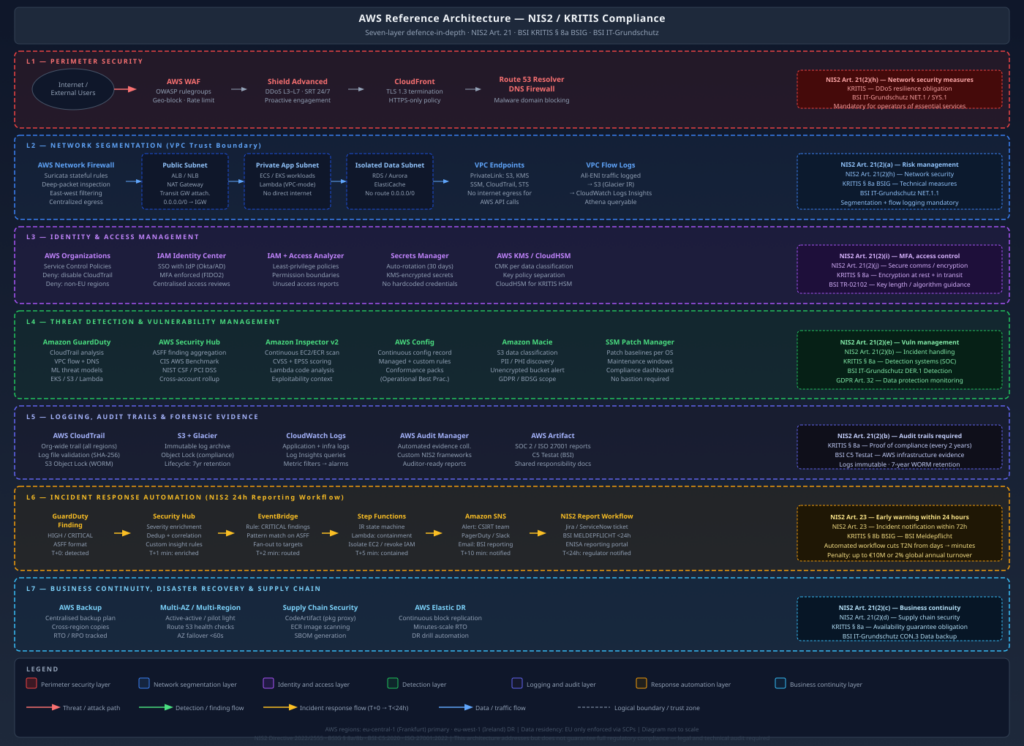
The diagram below shows the full seven-layer reference architecture. Each layer maps to specific NIS2 Article 21 obligations and KRITIS § 8a control requirements.
The architecture flows top-to-bottom through the security layers:
Perimeter (L1): All inbound traffic passes through CloudFront (TLS termination), AWS WAF (application-layer filtering), and Shield Advanced (DDoS absorption). Route 53 DNS Firewall blocks malicious domain resolution.
Network (L2): Inside the perimeter, Network Firewall applies stateful deep-packet inspection and east-west controls. A strict subnet segmentation model separates public, application, and data tiers. VPC endpoints eliminate internet egress for AWS API calls. VPC Flow Logs capture all ENI traffic.
Identity (L3): SCPs enforce hard guardrails at the Organizations level. Identity Center provides centralised, MFA-enforced human access. IAM Access Analyzer continuously detects over-privileged policies. KMS with CMKs controls all encryption operations.
Detection (L4): GuardDuty, Security Hub, Inspector, Config, Macie, and SSM Patch Manager run continuously across all accounts. Security Hub aggregates findings centrally.
Response (L6): The NIS2 24-hour reporting workflow – GuardDuty → Security Hub → EventBridge → Step Functions → SNS – automates the first response steps and produces a notification-ready incident record within minutes.
Business Continuity (L7): AWS Backup with cross-region copies, Elastic Disaster Recovery, and supply chain controls (CodeArtifact, ECR scanning, SBOM generation).
The NIS2 24-Hour Incident Notification Workflow
Article 23 NIS2 is one of the most operationally demanding provisions. Within 24 hours of becoming aware of a significant incident, you must submit an early warning to the BSI. “Becoming aware” is not defined as “concluding your investigation” – it means the moment you identify that an incident has occurred. In practice, this means your detection-to-notification pipeline must work automatically and must not depend on an analyst being available.
The tag condition is critical: it ensures the notification workflow fires specifically for KRITIS-tagged resources, not for every HIGH/CRITICAL finding across all accounts. Without this scope filter, non-KRITIS workloads flood the notification pipeline and cause alert fatigue that defeats the purpose.
The notification assembly Lambda generates a pre-populated BSI incident notification template:
The human analyst receives the pre-populated BSI report, verifies the details against the incident investigation, and submits via the BSI’s MELDEPFLICHT portal or the ENISA reporting system. The automated workflow ensures the 24-hour deadline is structurally reachable – it does not guarantee it if your CSIRT is unresponsive, but it eliminates the scenario where a finding sat in a queue unnoticed.
AWS Audit Manager: Building a Custom NIS2 Framework
AWS Audit Manager lets you create custom assessment frameworks that map NIS2 Article 21 obligations to specific AWS control evidence. This is the operational backbone of your BSI compliance submission.
The framework structure maps NIS2 control domains to AWS evidence sources:
# Boto3: create a custom NIS2 control set in Audit Managerimport boto3auditmanager = boto3.client('auditmanager',region_name='eu-central-1')# Create a control for NIS2 Art. 21(2)(i) - MFA enforcementcontrol = auditmanager.create_control(name='NIS2-Art21-2i-MFA-Enforcement',description='Verify MFA is enforced for all IAM users and Identity Center users',testingInformation='Check Security Hub FSBP.IAM.6 and CIS 1.10 findings. Verify IAM Identity Center MFA settings.',actionPlanTitle='Enable MFA for non-compliant users',actionPlanInstructions='Enforce FIDO2 MFA via Identity Center. Apply SCP to deny console access without MFA.',controlMappingSources=[{'sourceName':'SecurityHub-MFA-Check','sourceDescription':'Security Hub check for MFA on IAM users','sourceSetUpOption':'System_Controls_Mapping','sourceType':'AWS_Security_Hub','sourceKeyword':{'keywordInputType':'SELECT_FROM_LIST','keywordValue':'arn:aws:securityhub:::controls/aws-foundational-security-best-practices/v/1.0.0/IAM.6'},'troubleshootingText':'Navigate to Security Hub → Standards → FSBP → IAM.6'},{'sourceName':'CloudTrail-Console-SignIn-No-MFA','sourceDescription':'CloudTrail events for console sign-ins without MFA','sourceSetUpOption':'Procedural_Controls_Mapping','sourceType':'MANUAL','troubleshootingText':('Query CloudTrail: filter ConsoleLogin events where ''additionalEventData.MFAUsed = No')}])
Each NIS2 Article 21 sub-clause becomes a control set in the framework. Audit Manager collects evidence automatically from Config rules, Security Hub findings, and CloudTrail events. Manual evidence (third-party audit reports, vendor security questionnaires, penetration test results) is uploaded directly. The result is an auditor-ready assessment report that maps every control to its evidence – exactly what a BSI audit engagement requires.
AWS holds numerous third-party certifications that cover the infrastructure layer. For KRITIS compliance, the most relevant documents available from AWS Artifact are:
BSI C5 Testat (Cloud Computing Compliance Criteria Catalogue): Covers eu-central-1 (Frankfurt) and eu-west-1 (Ireland). This is the BSI’s own cloud security standard, and AWS holding this testat means auditors can rely on AWS’s controls for the infrastructure layer without re-auditing the data centre.
ISO 27001 Certificate: Covers all commercial AWS regions. Required baseline for most KRITIS auditors.
SOC 2 Type II Report: Documents AWS’s security, availability, and confidentiality controls with semi-annual independent auditor verification.
ISO 27017 (Cloud-specific security controls) and ISO 27018 (PII protection in cloud) certificates.
# Download AWS Artifact agreements programmaticallyawsartifactlist-reports\--query'reports[?category==`Certifications`].{Name:name,Period:period}'\--outputtable# Accept the NDA for a specific report and get download URLawsartifactget-report-url\--report-id<report-id>\--report-version<version>
The key message for auditors: AWS’s C5 Testat covers the infrastructure layer. Your organisation’s controls must cover the application and configuration layer. The two together constitute the complete compliance picture under shared responsibility.
Practical Implementation Roadmap
Starting a NIS2/KRITIS compliance programme on AWS from scratch is daunting. The following phased roadmap reflects what I have learned deploying this in practice – what you actually need to do in what order to avoid compliance gaps and rework.
Phase 0: Scoping and Inventory (Week 1–2)
Before you configure a single AWS service, you need to know what you are protecting:
Determine whether you qualify as an essential entity or important entity under NIS2. If you are in Germany, also check whether you exceed the BSI-KritisV sector thresholds for KRITIS designation.
Register with the BSI via the KRITIS portal if you meet KRITIS thresholds. Failure to register is itself a violation.
Identify all AWS accounts, regions, and services in scope. Tag all KRITIS-critical resources with ComplianceScope: KRITIS.
Map your data flows – which data enters your KRITIS-scoped systems, where it is stored, and which third parties have access.
Phase 1: Quick Wins (Days 1–30)
These controls have low implementation effort and high compliance impact. They also satisfy the most scrutinised controls in BSI audits:
Control
AWS Service
Time to Implement
Enable GuardDuty across all accounts
AWS Organizations + GuardDuty
2 hours
Enable Security Hub + CIS/FSBP standards
Security Hub
2 hours
Enable CloudTrail org-wide trail with validation
CloudTrail
4 hours
Enable S3 Object Lock on log buckets
S3
1 hour
Deploy MFA enforcement SCP
AWS Organizations
2 hours
Enable AWS Config with conformance packs
Config
4 hours
Enable Inspector v2 across all accounts
Inspector
1 hour
Enable VPC Flow Logs on all VPCs
VPC
2 hours
Enable Macie on KRITIS S3 buckets
Macie
2 hours
Rotate all long-lived IAM access keys
IAM
4–8 hours
Enable AWS Backup for critical resources
AWS Backup
4 hours
Download C5 Testat from AWS Artifact
AWS Artifact
30 minutes
This 30-day sprint addresses the most commonly cited deficiencies in BSI KRITIS audits and gives you an initial Security Hub compliance score to baseline against.
Phase 2: Architecture Hardening (Days 31–60)
Network segmentation: Implement the hub-and-spoke VPC model with AWS Network Firewall in the inspection VPC. Migrate public-facing workloads to the DMZ VPC. Configure VPC endpoints for all AWS services used by application workloads.
Identity hardening: Deploy IAM Identity Center with corporate IdP integration. Migrate all human IAM users to Identity Center. Enforce FIDO2 MFA. Delete all IAM users with console access. Run the IAM Access Analyzer unused access report and remediate.
Encryption uplift: Identify all resources using AWS-managed keys and migrate to CMKs. Enable automatic key rotation on all CMKs. Implement KMS key policies with data classification separation.
Patch management: Deploy SSM Patch Manager with KRITIS patch baselines. Enrol all EC2 instances in maintenance windows. Verify SSM agent coverage is 100% on KRITIS-scoped instances.
IR automation: Deploy the EventBridge → Step Functions → SNS incident notification pipeline. Test with a synthetic GuardDuty finding (use GuardDuty’s sample findings feature). Verify the BSI notification draft is generated correctly.
Audit Manager framework: Create the custom NIS2 assessment framework. Assign it to all KRITIS-scoped accounts. Review the initial evidence collection and remediate gaps.
Vulnerability management process: Define CVSS/EPSS thresholds and SLA targets. Integrate Inspector findings with your ticketing system. Run the first patch compliance report and remediate all CRITICAL findings.
Supply chain controls: Implement CodeArtifact proxies for all package managers. Enable ECR enhanced scanning. Define and implement an SBOM generation process for KRITIS-critical container images.
DR testing: Execute a DR drill – recover a KRITIS-scoped RDS instance from cross-region backup to eu-west-1. Document RTO achieved vs. RTO target. Store drill evidence in Audit Manager.
Penetration test: Commission an external penetration test of KRITIS-scoped systems. BSI auditors expect an annual penetration test as evidence of proactive risk management. The test results – including remediated findings – become Audit Manager evidence.
Documentation package: Prepare the BSI audit submission: security concept, risk register, technical measures list mapped to BSI IT-Grundschutz building blocks, ISMS documentation, and the Audit Manager assessment report.
Ongoing: Compliance-as-Operations
The steady state is not a project – it is a continuous operational programme:
Being precise about the gaps in the AWS-native approach saves you the embarrassment of discovering them in a BSI audit:
SOC processes: AWS services generate telemetry and findings. They do not analyse them. You need human analysts who understand the alerts, can distinguish true positives from false positives, and can conduct incident investigations. If you do not have an internal SOC capability, you need a MSSP – and under NIS2, your MSSP relationship is itself a supply chain security obligation (Art. 21(2)(d)) requiring formal security assessment.
Penetration testing: AWS Config rules and Security Hub findings do not substitute for penetration testing. Config rules check configuration; they do not test whether a determined attacker can chain multiple findings into a breach. Annual penetration tests of KRITIS-scoped systems are a BSI expectation.
Physical security for hybrid environments: If you have on-premises systems that feed into AWS (Direct Connect, VPN, on-premises processing that feeds S3), those physical systems are outside the shared responsibility model. Their physical and logical security is entirely your obligation.
Employee security training: NIS2 Art. 21(2)(g) requires cyber hygiene training for all personnel handling KRITIS-relevant systems. AWS has no service for this. This is a human process.
ISMS documentation: NIS2 requires documented security policies, risk management processes, and governance structures. AWS services generate evidence that you can point to. They do not write your ISMS for you.
Conclusion
KRITIS and NIS2 compliance on AWS is tractable, but it is not a checkbox exercise. The regulatory frameworks are specific enough that vague architectural statements – “we use encryption” or “we have monitoring” – will not survive a BSI audit. Auditors want to see the KMS key policy, the CloudTrail log validation output, the Patch Manager compliance dashboard showing 100% coverage, and the tested DR recovery time.
The AWS service landscape maps cleanly onto the NIS2 Article 21 control domains, with a few important caveats: you need CMKs (not AWS-managed keys) for encryption, you need Object Lock (not just versioning) for tamper-proof logs, and you need an org-wide CloudTrail (not account-level trails) for comprehensive audit coverage. These distinctions are not obvious from the service documentation but they are the ones that matter in an audit.
The 24-hour incident notification requirement in Art. 23 is the operational forcing function that makes the entire detection-to-response pipeline non-optional. If you cannot reliably get from “GuardDuty finding detected” to “BSI notification submitted” in under 24 hours without depending on an analyst being awake and available, you are non-compliant. Building the EventBridge → Step Functions notification workflow is not optional for KRITIS operators – it is the minimum automation needed to make the legal obligation structurally achievable.
Finally: if you are not registered with the BSI and you meet the KRITIS thresholds, fix that first. Unregistered KRITIS operators are easy to identify (sector-specific threshold checks are not secret) and face the same penalties as registered operators who are non-compliant with technical measures – plus additional penalties for the failure to register. The registration obligation is independent of and prior to any technical implementation work.
When a GuardDuty finding fires at 2 AM indicating credential compromise in a production AWS account, the quality of your incident response framework – not your engineer’s alertness – determines the blast radius. At work, I designed and built a cloud-native IR framework from scratch. This post documents the architecture, the automation, and the hard lessons from operating it against real incidents.
Why Traditional IR Frameworks Fail in the Cloud
On-premises IR assumes stable infrastructure: servers exist for weeks, network boundaries are physical, and forensic evidence sits on durable hardware. Cloud environments invert every assumption:
Ephemeral compute: EC2 instances and containers are terminated and replaced in minutes. By the time an analyst starts a forensic investigation, the evidence is gone.
IAM is the perimeter: Compromised credentials can pivot across services, accounts, and regions within seconds – without touching a network boundary.
Scale: A single misconfigured Lambda role can exfiltrate data from dozens of S3 buckets before a human analyst even opens the alert.
A cloud-native IR framework must automate the first 15 minutes of response – the window where containment matters – and preserve evidence with the same urgency.
Architecture Overview
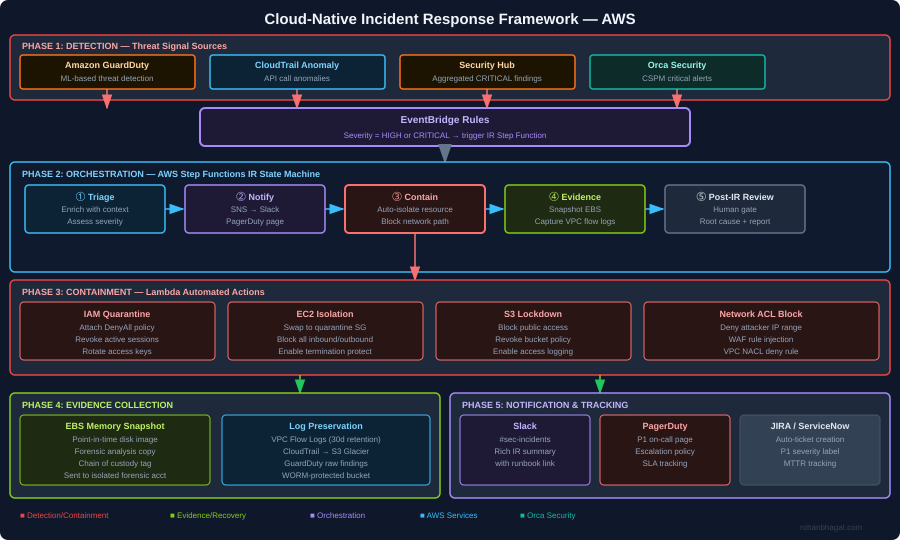
The framework has five phases operating as a continuous loop:
Detection: GuardDuty, CloudTrail anomaly detection, Security Hub aggregation, and Orca Security CSPM alerts feed findings into EventBridge.
Orchestration: An AWS Step Functions state machine coordinates the IR workflow – no human required for the first three phases.
Containment: Lambda functions execute automated containment actions within seconds of triage completion.
Evidence collection: EBS snapshots, VPC flow logs, and CloudTrail records are preserved in an isolated forensics account before any containment action could destroy them.
Notification and tracking: SNS routes alerts to Slack, PagerDuty (P1 page), and auto-creates a JIRA ticket with full finding context.
EventBridge: The Entry Point for All IR Flows
Every security finding enters the IR framework through EventBridge. The rule targets HIGH and CRITICAL severity findings:
The EventBridge target is the Step Functions state machine ARN. The finding detail is passed directly as the state machine input — no transformation needed.
AWS Step Functions: The IR State Machine
Step Functions orchestrates the IR workflow as a sequence of Lambda invocations. If any step fails, the state machine routes to a notification path rather than silently dying:
The PostIncidentGate step uses a .waitForTaskToken pattern — the state machine pauses and waits for a human analyst to send the task token via the JIRA ticket before closing the IR loop. This prevents the automation from proceeding to recovery without human sign-off.
Playbook: Credential Compromise Response
Credential compromise is the most time-sensitive IR scenario in AWS. A compromised IAM access key can be used from anywhere in the world. This is the automation for the QuarantineIAM Lambda:
This does not delete the user or their access keys — it preserves evidence. The deactivated keys remain as forensic artefacts, and the IAM policy change appears in CloudTrail for chain-of-custody purposes.
Playbook: EC2 Isolation
For a compromised EC2 instance (malware, cryptominer, lateral movement), isolation means cutting all network connectivity while preserving the instance for forensics:
The forensic security group has no inbound or outbound rules — effectively air-gapping the instance while keeping it running for live memory analysis if required.
Evidence Preservation in an Isolated Forensics Account
All forensic evidence is written to a dedicated Forensics account that no engineer has standing access to. The S3 forensics bucket uses Object Lock (WORM) to prevent evidence tampering:
The cross-account Lambda role has s3:PutObject permission only. No engineer has s3:GetObject on this bucket without going through the break-glass procedure — which itself triggers an alert.
MTTR Measurement and Tuning
After deploying the framework, I measured Mean Time to Respond (MTTR) across three incident categories:
Incident Type
Before (Manual)
After (Automated)
Reduction
Credential compromise
~4 hours
~6 minutes (containment)
97%
Public S3 bucket
~2 hours
~3 minutes (remediation)
97.5%
GuardDuty EC2 finding
~6 hours
~12 minutes (isolation)
97%
CloudTrail disabled
~8 hours
~4 minutes (re-enable)
99%
The 6-minute “credential compromise” time includes: GuardDuty detection lag (~2 min), EventBridge routing (~30s), Step Functions triage (~1 min), IAM quarantine Lambda (~30s), and notification delivery (~2 min). Human analysts see the PagerDuty page and the fully-enriched Slack message simultaneously.
Lessons Learned
1. Evidence before containment — always The first instinct is to cut off the attacker. The professional instinct is to preserve evidence before you do anything that changes the environment. The framework runs the PreserveEvidence step in parallel with containment using Step Functions parallel states in the production version.
2. Quarantine ≠ delete Never delete a compromised resource during IR. Deactivate, isolate, or detach — but preserve. Deletion destroys forensic artefacts and can complicate chain-of-custody for legal purposes.
3. Automate the boring parts, gate the dangerous parts Auto-remediate commodity findings (public S3, disabled CloudTrail, open security groups). But for findings that require destructive action (instance termination, user deletion, data purge), require human approval via the Step Functions task-token gate.
4. Alert quality over alert quantity Before the framework, on-call received 200+ GuardDuty findings per week. After tuning suppression rules for known-good behaviour (Nessus scanner IPs, deployment pipeline roles, monitoring agents), the actionable alert volume dropped to ~15 per week — all of which were genuine findings.
5. Test your playbooks before an incident Run regular IR exercises (fire drills) against non-production accounts. The worst time to discover a bug in your quarantine Lambda is during a real credential compromise at 3 AM.
In a multi-account AWS environment handling energy trading workloads, a single misconfigured S3 bucket or an overly permissive IAM role is not just a security finding — it is a compliance violation, a potential regulatory breach, and an audit risk. At RWE Supply & Trading, I faced this challenge at scale: dozens of accounts, hundreds of Terraform modules, and a continuous pressure to ship infrastructure quickly without compromising security posture.
This post documents the CSPM architecture I designed and implemented: a centralized, automated control plane that continuously monitors posture, enforces policy, and auto-remediates critical findings — all driven by Infrastructure as Code.
The Problem with Point-in-Time Security Reviews
Traditional cloud security reviews are periodic. A team runs a checklist against a snapshot of the environment, flags findings, and assigns tickets. By the time those tickets are resolved, the environment has drifted further. In fast-moving cloud environments, this model breaks down within weeks.
The operational shift required is continuous posture management: every configuration change is evaluated against policy the moment it is applied, and deviations are either blocked before they land or remediated automatically within minutes.
Architecture Overview
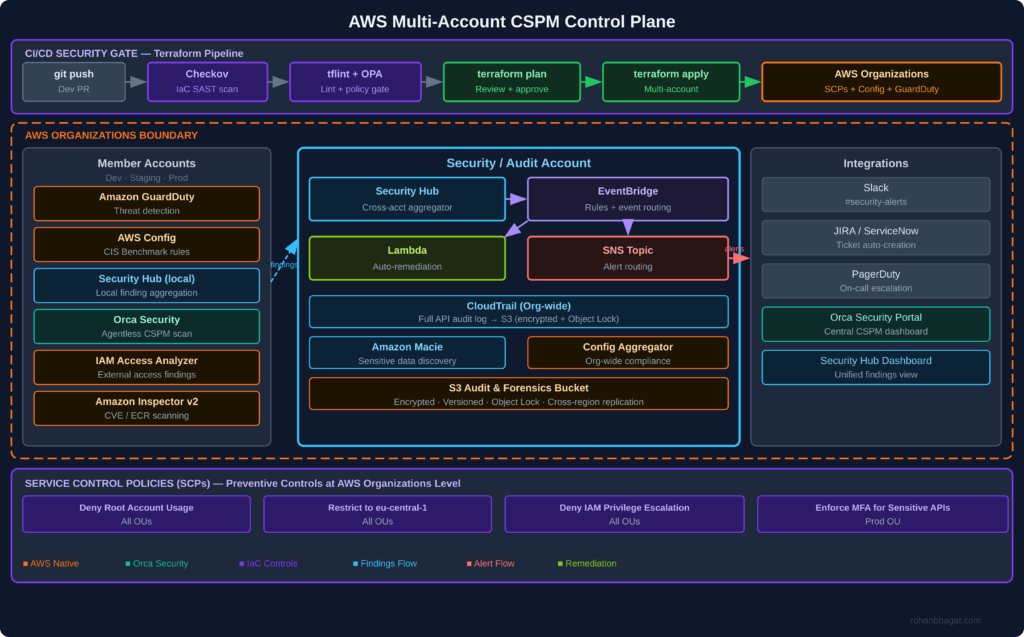
CSPM Control Plane Architecture
The architecture has three layers:
1. Preventive layer: Checkov and OPA run in the CI/CD pipeline and block non-compliant Terraform before it is applied. AWS Service Control Policies (SCPs) at the Organizations level enforce hard boundaries that no account-level policy can override.
2. Detective layer: AWS GuardDuty, Config Rules, Security Hub, and Orca Security continuously monitor all accounts. Security Hub aggregates findings centrally in the Security/Audit account.
3. Responsive layer: EventBridge rules trigger Lambda functions that auto-remediate critical findings (e.g., public S3 buckets, disabled CloudTrail, overly permissive security groups) within minutes of detection.
Setting Up the Security Account as the Control Plane
All findings flow into a dedicated Security/Audit account. This account is not a workload account — it exists solely to aggregate, analyse, and act on security findings.
Each member account is enrolled automatically via AWS Organizations, so new accounts inherit the full security stack on creation — no manual onboarding required.
Preventive Controls: Checkov + OPA in the CI/CD Pipeline
The pipeline never reaches `terraform apply` unless the IaC passes security linting. Checkov runs first, validating Terraform plans against 500+ built-in rules covering CIS, NIST, and PCI-DSS:
After Checkov, an OPA policy gate evaluates the Terraform plan JSON against custom Rego policies specific to our environment:
# policies/no_public_s3.regopackageterraform.s3deny[msg] { resource :=input.resource_changes[_]resource.type=="aws_s3_bucket_public_access_block"resource.change.after.block_public_acls==false msg :=sprintf("S3 bucket '%v' must block public ACLs", [resource.address])}deny[msg] { resource :=input.resource_changes[_]resource.type=="aws_s3_bucket"notresource.change.after.server_side_encryption_configuration msg :=sprintf("S3 bucket '%v' must have server-side encryption enabled", [resource.address])}
Any `deny` result blocks the pipeline and posts the violation reason directly to the PR as a review comment.
Deploying AWS Config Rules at Scale with Terraform
AWS Config Rules run continuously in every account, evaluating resources against compliance rules whenever a configuration change is detected. I deploy them as an organization-wide Terraform module:
# modules/config-rules/main.tfresource"aws_config_config_rule""cis_s3_public_access"{name="s3-bucket-public-read-prohibited"description="CIS 2.1.2 - S3 buckets must not allow public read"source{owner="AWS"source_identifier="S3_BUCKET_PUBLIC_READ_PROHIBITED"}depends_on= [aws_config_configuration_recorder.main]}resource"aws_config_config_rule""mfa_enabled_for_iam_console"{name="mfa-enabled-for-iam-console-access"description="CIS 1.2 - MFA required for console access"source{owner="AWS"source_identifier="MFA_ENABLED_FOR_IAM_CONSOLE_ACCESS"}}resource"aws_config_config_rule""cloudtrail_enabled"{name="cloudtrail-enabled"description="CIS 2.1 - CloudTrail must be enabled in all regions"source{owner="AWS"source_identifier="CLOUD_TRAIL_ENABLED"}}resource"aws_config_config_rule""encrypted_volumes"{name="encrypted-volumes"description="CIS 2.2.1 - EBS volumes must be encrypted"source{owner="AWS"source_identifier="ENCRYPTED_VOLUMES"}}
Findings from Config flow into Security Hub, which normalises them into the ASFF (Amazon Security Finding Format) alongside GuardDuty and Inspector findings.
Auto-Remediation with EventBridge and Lambda
Critical findings trigger immediate automated responses. The EventBridge rule pattern targets findings by severity and type:
For findings that cannot be auto-remediated safely (e.g., IAM policy changes), the Lambda creates a JIRA ticket with the finding detail, account ID, resource ARN, and a link to the relevant runbook.
Service Control Policies: The Non-Bypassable Layer
SCPs apply at the AWS Organizations level and cannot be overridden by any IAM policy within a member account, including root. This is the last-resort preventive control:
The region restriction alone eliminates a large class of shadow-IT risks. If a developer accidentally provisions resources in `us-east-1`, the SCP blocks the API call before it lands.
Integrating Orca Security for Agentless CSPM
Orca Security complements AWS-native tooling with agentless scanning that reads cloud provider APIs and storage snapshots without deploying agents into workloads. In the Orca dashboard, I configure:
– Attack path analysis: Identifies multi-hop paths from the internet to sensitive data (e.g., internet-facing EC2 → unrestricted S3 → PII data)
– Vulnerability prioritisation: CVEs ranked by exploitability and lateral movement risk, not just CVSS score
Orca findings feed back into Security Hub via the Orca Security Hub integration, keeping all findings in one pane of glass.
Results After 6 Months
After deploying this architecture across the full AWS estate:
– CI/CD gate blocks: Checkov catches an average of 12 IaC policy violations per sprint before they reach the AWS environment
– Mean time to remediate critical findings dropped from ~72 hours (manual ticket) to **< 8 minutes** for auto-remediable findings
– False-positive rate: GuardDuty tuning and Security Hub suppression rules reduced noisy, low-value alerts by approximately 60%, so the on-call team focuses on signal
– Compliance posture: CIS AWS Foundations Benchmark v3.0 score improved from 62% → 91% within the first quarter
Key Takeaways
1. Shift left first: The cheapest fix is blocking a misconfiguration in the CI/CD pipeline before it reaches AWS. Checkov + OPA running on every PR costs nothing compared to a breach or audit finding.
2. Don’t build a SIEM, build automation: The goal of a CSPM control plane is not to show findings — it is to close them. Every HIGH/CRITICAL finding should have an automated response path.
3. SCPs are your safety net, not your primary control: SCPs are powerful but blunt. Use them for hard organisational boundaries, not fine-grained policy enforcement.
4. Orca and AWS-native tooling are complementary: AWS native services (GuardDuty, Inspector, Config) have deep integration and low latency. Orca adds context (attack paths, sensitive data identification) that native tools do not provide.
5. Measure posture, not findings: Report compliance score trends (CIS score over time), not raw finding counts. Leadership cares whether posture is improving, not how many findings were generated this week.