Recently I planned to upgrade my laptop from Fedora 13 to Fedora 16.
Earlier I used to burn DVDs of the downloaded iso images of Fedoras.
This time I decided to setup PXE boot server on my desktop which is running Fedora 15.
I found a good post of setting up PXE boot server here.
I used it as reference and created the PXE server as described. But somehow it didn’t work for me as expected.
So I did some modification on the steps described in the post as it was written for FC4.
I am listing it down to save the time.
As I was doing it in my home network only, I did not isolate the network, as it was already isolated and only my desktop and laptop was connected to the network via ADSL router (The router was also serving as dhcp server, but I disabled it as I was configuring PXE boot server on my desktop which has dhcp server configuration)
Then I installed the required packages which are tftp-server, dhcp, syslinux and http via yum.
yum install tftp-server dhcp syslinux http -y
Then on second step I configured my dhcp server as below.
In the reference the dhcp path was /etc/dhcpd.conf which was for FC4 and for Fedora 15 its changed to /etc/dhcp/dhcpd.conf
The contents of the dhcpd.conf file is below
ddns-update-style interim;
subnet 192.168.1.0 netmask 255.255.255.0 {
range 192.168.1.10 192.168.1.254;
default-lease-time 3600;
max-lease-time 4800;
option routers 192.168.1.1;
option domain-name-servers 192.168.1.1;
option subnet-mask 255.255.255.0;
option domain-name "home.local";
option time-offset -8;
}
host lap0 {
hardware ethernet 04:4B:EE:80:FF:03;
fixed-address 192.168.1.254;
option host-name "lap0";
option next-server 192.168.1.2;
filename "pxelinux.0";
}
What I did is to setup a DNS and DHCP server which will assign the IP address 192.168.1.254 to the laptop with MAC address 04:4B:EE:80:FF:03.
Now for third step I did as follows.
Here I configured tftp server which will serve the PXE kernel to the PXE-boot capable laptop NIC for network booting.
The steps are as follows
Open and edit the /etc/xinetd.d/tftp file and make the changes as follows.
Change the line with disable=yes to disable=no
Change the line with srv_args = -s /var/lib/tftpboot to srv_args = -s /tftpboot
Here we enabled the tftp service and changed the root directory of tftp from /var/lib/tftpboot to /tftpboot
For some reason this didn’t work for me first time, so I uninstalled tftp-server and re installed again and that fixed the issue.
We are almost ready to finish. Now we only need to copy the necessary files and setup the apache and tftp-server to complete it.
Step four is as follows.
Create the directory /tftpboot/pxelinux.cfg
Now go the pxelinux.cfg directory and create a file default.
This is our default boot option file and put the contents as follows
prompt 1
default Fedora 16 x64 Install
timeout 100
label Fedora 16 x64 Install
kernel vmlinuz
append initrd=initrd.img ramdisk_size=9216 noapic acpi=off install=http://192.168.1.2/linux
Copy the file pxelinux.0 from /usr/share/syslinux to /tftpboot
Now we need the vmlinuz and initrd images for booting. For that we need to mount the iso image and copy the vmlinuz and initrd.img files from the isolinux directory on DVD.
After that I created a fedora install directory under /tftpboot/fedora-install.
Now we need to make it available via http so I did as follows.
Created a file /etc/httpd/conf.d/fedora_install.conf
And added the contents as follows.
Alias /linux /tftpboot/fedora-install
 <Directory /tftpboot/fedora-install>
 Options Indexes
 AllowOverride None
 </Directory>
Now restart the apache and xinetd for tftp PXE boot to take effect.
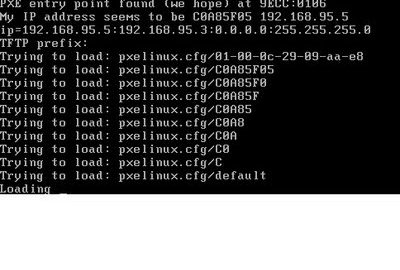
That is it. Now all I did is plug in my Laptop in the network and turn it on to boot via Network and voila.
Installation screen of Fedora 16 presented itself to complete it.
You can also use NFS and FTP install method the similar way.
That’s it for now. Please post your comments.
